# Appendices {#sec-appendices}
## Appendix A — Supplementary Material for Chapter 3 {#sec-appendix-a}
### Participants
Of the 3,065 participants that originally signed up for participation, 1,449 (47.3%) responded to the onboarding invitation, provided informed consent and began receiving questionnaires. After removing participants that did not meet our eligibility criteria or who completed too few ESM questionnaires (pre-registered minimum of 8), the data of 1,315 participants were retained for formal analyses.
Persons willing to sign up for our study were first directed to a webpage that provided them with a study overview, and then were directed to complete an online form that verified they met our eligibility criteria: that they were aged 18 years or over, owned a smartphone, and were willing to complete the two-week ESM phase. After signing up, participants immediately received an automated email that provided full study information. Up to one week afterwards, participants received an invitation email which contained a link that directed them to our onboarding website. Here, they once more found all study information (presented both in print and in a video format) as well as detailed instructions to download and install one or two smartphone apps. Participants could also opt to have their computer monitored (e.g., screentime), but this data is not the focus of the current study, so it is not discussed.
### Onboarding and ESM
In the experience sampling app, participants provided informed consent and received an intake questionnaire that measured their age, education status, and occupation, as well as other factors not of focal interest to the present study (a full method is available at our OSF page). Immediately after, participants began receiving ESM questionnaires according to a mixed-sampling scheme that contained semi-random and fixed elements. Following the initial notification, each ESM questionnaire remained available to the participant for 45 min. A reminder was sent out if the questionnaire had not been responded to 30 min after the initial notification. In total, participants received ESM questionnaires for 14 full days. After completing the ESM phase, participants received an outtake questionnaire that also measured factors that are not of direct interest to the present study (e.g., Trait Anxiety).
The first questionnaire of the day contained twenty-six items, the last questionnaire thirty-four, and the four in-between twenty-four items. Each questionnaire was identical in content, apart from the question's stem. Also, each questionnaire was presented to participants in a random order, to counter order effects.
### Data preparation
Raw smartphone trace data was processed using Python packages pandas and Dask, and afterwards merged with the ESM data. This combined dataset enabled calculation of the three behavioral features. Additional data preparation (e.g., centering, lagging, etc.), as well as formal analyses, were conducted in R, using the packages dplyr, esmpack, misty (for grand-mean centering), and lavaan (for CFA and multilevel SEM models).
We first examined data for outliers and data errors, and whether model assumptions were met for later analyses (e.g., linearity). Then, select variables (e.g., mental fatigue) were lagged to the next dataset row to enable modeling across adjoining timepoints. For each participant, variables were only lagged when the next dataset row also represented the next received questionnaire for that person (thus, data from questionnaire 4, for instance, would only be able to predict data from questionnaire 5 for that same participant), and belonged to the same day (thus, data from the last questionnaire of the day could not predict data from the first questionnaire of the next day, an important analytic decision given the extensive temporal gap that would otherwise result between these questionnaires).
Following, level 2 versions of select level 1 variables (e.g., mental fatigue) were created to enable later analyses (i.e., the level 2 variable represented the average of level 1 variable values for a given participant). Level 1 (observation level) variables were then person-mean centered, to ensure model coefficients (in our Multilevel SEM) characterized the pure within-person relationship (i.e., with between-person variance removed). The centered behavioral features were additionally standardized at the within-person level to ensure model variables shared similar scales. Level 2 (person-level) variables were grand-mean centered to facilitate intercept interpretation. However, level 2 variables were only needed to saturate the level 2 model and enable multilevel SEM functionality with lavaan.
All code used in processing the data can be found on osf, under Data and Code / code. Please refer to the folder's README.txt for further information on which file contains which data processing steps.
The Android tracking app encountered issues on certain devices (Xiaomi, Huawei and Samsung). The main issue was the smartphone OS restricting access to different tracking data after a certain period of time. In response, we set up a monitoring dashboard to look for instances of potential data loss and could then troubleshoot with our participants. By providing device-specific instructions (see <https://dontkillmyapp.com/>) we could often pinpoint the cause and restore access.
### Original Models
To keep the results section concise, only the results of the finalized models were discussed. The original models (with poor model fit), and the step-by-step procedure is detailed on osf. If you would like to run through the code itself, you can find an R Markdown file under Data and Code / code / 06_structural_models.Rmd. Alternatively, you can find a rendered version of this markdown file with the output of these models under: Data and Code / code / rendered_notebooks / 06_structural_models.html. This html page takes you through all the data analysis steps, informing about all analytical decisions taken.
{{< pagebreak >}}
## Appendix B — Supplementary Material for Chapter 4 {#sec-appendix-b}
### Mediation Models Output
::: {#tbl-rushed-mediation}
```{=html}
<table>
<tbody>
<tr>
<td style="border-top: 1.5pt solid black; border-bottom: 0.5pt solid black; font-weight: bold; text-align: left;">Outcome</td>
<td style="border-top: 1.5pt solid black; border-bottom: 0.5pt solid black; font-weight: bold; text-align: left;">Predictor</td>
<td style="border-top: 1.5pt solid black; border-bottom: 0.5pt solid black; font-weight: bold; text-align: right;">B</td>
<td style="border-top: 1.5pt solid black; border-bottom: 0.5pt solid black; font-weight: bold; text-align: right;">SE</td>
<td style="border-top: 1.5pt solid black; border-bottom: 0.5pt solid black; font-weight: bold; text-align: right;">LL</td>
<td style="border-top: 1.5pt solid black; border-bottom: 0.5pt solid black; font-weight: bold; text-align: right;">UL</td>
<td style="border-top: 1.5pt solid black; border-bottom: 0.5pt solid black; font-weight: bold; text-align: right;">p</td>
<td style="border-top: 1.5pt solid black; border-bottom: 0.5pt solid black; font-weight: bold; text-align: right;">β</td>
</tr>
<tr><td colspan="8" style="font-weight: bold; text-align: left; padding-top: 0.5em;">chat duration</td></tr>
<tr><td style="text-align: left;">rushed</td><td style="text-align: left;">chat duration (c)</td><td style="text-align: right;">−.001</td><td style="text-align: right;">.007</td><td style="text-align: right;">−.014</td><td style="text-align: right;">.013</td><td style="text-align: right;">.916</td><td style="text-align: right;">−.000</td></tr>
<tr><td style="text-align: left;">rushed</td><td style="text-align: left;">work activity</td><td style="text-align: right;">.471</td><td style="text-align: right;">.045</td><td style="text-align: right;">.383</td><td style="text-align: right;">.558</td><td style="text-align: right;">.000</td><td style="text-align: right;">.138</td></tr>
<tr><td style="text-align: left;">rushed</td><td style="text-align: left;">morning</td><td style="text-align: right;">−.016</td><td style="text-align: right;">.019</td><td style="text-align: right;">−.054</td><td style="text-align: right;">.021</td><td style="text-align: right;">.398</td><td style="text-align: right;">−.004</td></tr>
<tr><td style="text-align: left;">rushed</td><td style="text-align: left;">evening</td><td style="text-align: right;">−.005</td><td style="text-align: right;">.019</td><td style="text-align: right;">−.041</td><td style="text-align: right;">.032</td><td style="text-align: right;">.795</td><td style="text-align: right;">−.001</td></tr>
<tr><td style="text-align: left;">juggling load</td><td style="text-align: left;">chat duration (a)</td><td style="text-align: right;">.025</td><td style="text-align: right;">.003</td><td style="text-align: right;">.019</td><td style="text-align: right;">.032</td><td style="text-align: right;">.000</td><td style="text-align: right;">.037</td></tr>
<tr><td style="text-align: left;">juggling load</td><td style="text-align: left;">work activity</td><td style="text-align: right;">.594</td><td style="text-align: right;">.016</td><td style="text-align: right;">.563</td><td style="text-align: right;">.625</td><td style="text-align: right;">.000</td><td style="text-align: right;">.431</td></tr>
<tr><td style="text-align: left;">juggling load</td><td style="text-align: left;">morning</td><td style="text-align: right;">−.033</td><td style="text-align: right;">.008</td><td style="text-align: right;">−.048</td><td style="text-align: right;">−.017</td><td style="text-align: right;">.000</td><td style="text-align: right;">−.022</td></tr>
<tr><td style="text-align: left;">juggling load</td><td style="text-align: left;">evening</td><td style="text-align: right;">.008</td><td style="text-align: right;">.008</td><td style="text-align: right;">−.009</td><td style="text-align: right;">.024</td><td style="text-align: right;">.362</td><td style="text-align: right;">.005</td></tr>
<tr><td style="text-align: left;">rushed</td><td style="text-align: left;">juggling load (b)</td><td style="text-align: right;">.839</td><td style="text-align: right;">.035</td><td style="text-align: right;">.771</td><td style="text-align: right;">.907</td><td style="text-align: right;">.000</td><td style="text-align: right;">.339</td></tr>
<tr><td style="text-align: left;">ab</td><td style="text-align: left;">a*b</td><td style="text-align: right;">.021</td><td style="text-align: right;">.003</td><td style="text-align: right;">.016</td><td style="text-align: right;">.027</td><td style="text-align: right;">.000</td><td style="text-align: right;">.013</td></tr>
<tr><td style="text-align: left;">total</td><td style="text-align: left;">c+(a*b)</td><td style="text-align: right;">.021</td><td style="text-align: right;">.007</td><td style="text-align: right;">.007</td><td style="text-align: right;">.034</td><td style="text-align: right;">.003</td><td style="text-align: right;">.012</td></tr>
<tr><td colspan="8" style="font-weight: bold; text-align: left; padding-top: 0.5em;">chat frequency</td></tr>
<tr><td style="text-align: left;">rushed</td><td style="text-align: left;">chat frequency (c)</td><td style="text-align: right;">−.003</td><td style="text-align: right;">.007</td><td style="text-align: right;">−.016</td><td style="text-align: right;">.011</td><td style="text-align: right;">.700</td><td style="text-align: right;">−.002</td></tr>
<tr><td style="text-align: left;">rushed</td><td style="text-align: left;">work activity</td><td style="text-align: right;">.471</td><td style="text-align: right;">.045</td><td style="text-align: right;">.383</td><td style="text-align: right;">.558</td><td style="text-align: right;">.000</td><td style="text-align: right;">.138</td></tr>
<tr><td style="text-align: left;">rushed</td><td style="text-align: left;">morning</td><td style="text-align: right;">−.017</td><td style="text-align: right;">.019</td><td style="text-align: right;">−.055</td><td style="text-align: right;">.021</td><td style="text-align: right;">.383</td><td style="text-align: right;">−.005</td></tr>
<tr><td style="text-align: left;">rushed</td><td style="text-align: left;">evening</td><td style="text-align: right;">−.005</td><td style="text-align: right;">.019</td><td style="text-align: right;">−.041</td><td style="text-align: right;">.032</td><td style="text-align: right;">.804</td><td style="text-align: right;">−.001</td></tr>
<tr><td style="text-align: left;">juggling load</td><td style="text-align: left;">chat frequency (a)</td><td style="text-align: right;">.023</td><td style="text-align: right;">.003</td><td style="text-align: right;">.016</td><td style="text-align: right;">.029</td><td style="text-align: right;">.000</td><td style="text-align: right;">.033</td></tr>
<tr><td style="text-align: left;">juggling load</td><td style="text-align: left;">work activity</td><td style="text-align: right;">.594</td><td style="text-align: right;">.016</td><td style="text-align: right;">.563</td><td style="text-align: right;">.625</td><td style="text-align: right;">.000</td><td style="text-align: right;">.431</td></tr>
<tr><td style="text-align: left;">juggling load</td><td style="text-align: left;">morning</td><td style="text-align: right;">−.031</td><td style="text-align: right;">.008</td><td style="text-align: right;">−.047</td><td style="text-align: right;">−.016</td><td style="text-align: right;">.000</td><td style="text-align: right;">−.021</td></tr>
<tr><td style="text-align: left;">juggling load</td><td style="text-align: left;">evening</td><td style="text-align: right;">.008</td><td style="text-align: right;">.008</td><td style="text-align: right;">−.008</td><td style="text-align: right;">.024</td><td style="text-align: right;">.336</td><td style="text-align: right;">.006</td></tr>
<tr><td style="text-align: left;">rushed</td><td style="text-align: left;">juggling load (b)</td><td style="text-align: right;">.839</td><td style="text-align: right;">.035</td><td style="text-align: right;">.771</td><td style="text-align: right;">.907</td><td style="text-align: right;">.000</td><td style="text-align: right;">.339</td></tr>
<tr><td style="text-align: left;">ab</td><td style="text-align: left;">a*b</td><td style="text-align: right;">.019</td><td style="text-align: right;">.003</td><td style="text-align: right;">.014</td><td style="text-align: right;">.024</td><td style="text-align: right;">.000</td><td style="text-align: right;">.011</td></tr>
<tr><td style="text-align: left;">total</td><td style="text-align: left;">c+(a*b)</td><td style="text-align: right;">.016</td><td style="text-align: right;">.007</td><td style="text-align: right;">.002</td><td style="text-align: right;">.030</td><td style="text-align: right;">.024</td><td style="text-align: right;">.010</td></tr>
<tr><td colspan="8" style="font-weight: bold; text-align: left; padding-top: 0.5em;">chat notifications</td></tr>
<tr><td style="text-align: left;">rushed</td><td style="text-align: left;">chat notifications (c)</td><td style="text-align: right;">.014</td><td style="text-align: right;">.007</td><td style="text-align: right;">−.000</td><td style="text-align: right;">.029</td><td style="text-align: right;">.053</td><td style="text-align: right;">.008</td></tr>
<tr><td style="text-align: left;">rushed</td><td style="text-align: left;">work activity</td><td style="text-align: right;">.468</td><td style="text-align: right;">.045</td><td style="text-align: right;">.381</td><td style="text-align: right;">.556</td><td style="text-align: right;">.000</td><td style="text-align: right;">.137</td></tr>
<tr><td style="text-align: left;">rushed</td><td style="text-align: left;">morning</td><td style="text-align: right;">−.011</td><td style="text-align: right;">.019</td><td style="text-align: right;">−.049</td><td style="text-align: right;">.027</td><td style="text-align: right;">.565</td><td style="text-align: right;">−.003</td></tr>
<tr><td style="text-align: left;">rushed</td><td style="text-align: left;">evening</td><td style="text-align: right;">−.006</td><td style="text-align: right;">.019</td><td style="text-align: right;">−.043</td><td style="text-align: right;">.030</td><td style="text-align: right;">.738</td><td style="text-align: right;">−.002</td></tr>
<tr><td style="text-align: left;">juggling load</td><td style="text-align: left;">chat notifications (a)</td><td style="text-align: right;">.028</td><td style="text-align: right;">.003</td><td style="text-align: right;">.022</td><td style="text-align: right;">.034</td><td style="text-align: right;">.000</td><td style="text-align: right;">.041</td></tr>
<tr><td style="text-align: left;">juggling load</td><td style="text-align: left;">work activity</td><td style="text-align: right;">.591</td><td style="text-align: right;">.016</td><td style="text-align: right;">.559</td><td style="text-align: right;">.622</td><td style="text-align: right;">.000</td><td style="text-align: right;">.428</td></tr>
<tr><td style="text-align: left;">juggling load</td><td style="text-align: left;">morning</td><td style="text-align: right;">−.028</td><td style="text-align: right;">.008</td><td style="text-align: right;">−.044</td><td style="text-align: right;">−.012</td><td style="text-align: right;">.000</td><td style="text-align: right;">−.019</td></tr>
<tr><td style="text-align: left;">juggling load</td><td style="text-align: left;">evening</td><td style="text-align: right;">.008</td><td style="text-align: right;">.008</td><td style="text-align: right;">−.008</td><td style="text-align: right;">.024</td><td style="text-align: right;">.336</td><td style="text-align: right;">.006</td></tr>
<tr><td style="text-align: left;">rushed</td><td style="text-align: left;">juggling load (b)</td><td style="text-align: right;">.838</td><td style="text-align: right;">.035</td><td style="text-align: right;">.770</td><td style="text-align: right;">.906</td><td style="text-align: right;">.000</td><td style="text-align: right;">.339</td></tr>
<tr><td style="text-align: left;">ab</td><td style="text-align: left;">a*b</td><td style="text-align: right;">.023</td><td style="text-align: right;">.003</td><td style="text-align: right;">.018</td><td style="text-align: right;">.029</td><td style="text-align: right;">.000</td><td style="text-align: right;">.014</td></tr>
<tr><td style="text-align: left;">total</td><td style="text-align: left;">c+(a*b)</td><td style="text-align: right;">.038</td><td style="text-align: right;">.008</td><td style="text-align: right;">.023</td><td style="text-align: right;">.053</td><td style="text-align: right;">.000</td><td style="text-align: right;">.022</td></tr>
<tr><td colspan="8" style="font-weight: bold; text-align: left; padding-top: 0.5em;">chat fragmentation</td></tr>
<tr><td style="text-align: left;">rushed</td><td style="text-align: left;">chat fragmentation (c)</td><td style="text-align: right;">.003</td><td style="text-align: right;">.006</td><td style="text-align: right;">−.010</td><td style="text-align: right;">.015</td><td style="text-align: right;">.686</td><td style="text-align: right;">.002</td></tr>
<tr><td style="text-align: left;">rushed</td><td style="text-align: left;">work activity</td><td style="text-align: right;">.470</td><td style="text-align: right;">.045</td><td style="text-align: right;">.383</td><td style="text-align: right;">.558</td><td style="text-align: right;">.000</td><td style="text-align: right;">.138</td></tr>
<tr><td style="text-align: left;">rushed</td><td style="text-align: left;">morning</td><td style="text-align: right;">−.016</td><td style="text-align: right;">.019</td><td style="text-align: right;">−.053</td><td style="text-align: right;">.022</td><td style="text-align: right;">.418</td><td style="text-align: right;">−.004</td></tr>
<tr><td style="text-align: left;">rushed</td><td style="text-align: left;">evening</td><td style="text-align: right;">−.005</td><td style="text-align: right;">.019</td><td style="text-align: right;">−.042</td><td style="text-align: right;">.031</td><td style="text-align: right;">.778</td><td style="text-align: right;">−.002</td></tr>
<tr><td style="text-align: left;">juggling load</td><td style="text-align: left;">chat fragmentation (a)</td><td style="text-align: right;">.026</td><td style="text-align: right;">.003</td><td style="text-align: right;">.019</td><td style="text-align: right;">.032</td><td style="text-align: right;">.000</td><td style="text-align: right;">.038</td></tr>
<tr><td style="text-align: left;">juggling load</td><td style="text-align: left;">work activity</td><td style="text-align: right;">.594</td><td style="text-align: right;">.016</td><td style="text-align: right;">.562</td><td style="text-align: right;">.625</td><td style="text-align: right;">.000</td><td style="text-align: right;">.430</td></tr>
<tr><td style="text-align: left;">juggling load</td><td style="text-align: left;">morning</td><td style="text-align: right;">−.033</td><td style="text-align: right;">.008</td><td style="text-align: right;">−.049</td><td style="text-align: right;">−.017</td><td style="text-align: right;">.000</td><td style="text-align: right;">−.022</td></tr>
<tr><td style="text-align: left;">juggling load</td><td style="text-align: left;">evening</td><td style="text-align: right;">.007</td><td style="text-align: right;">.008</td><td style="text-align: right;">−.009</td><td style="text-align: right;">.023</td><td style="text-align: right;">.387</td><td style="text-align: right;">.005</td></tr>
<tr><td style="text-align: left;">rushed</td><td style="text-align: left;">juggling load (b)</td><td style="text-align: right;">.839</td><td style="text-align: right;">.035</td><td style="text-align: right;">.770</td><td style="text-align: right;">.907</td><td style="text-align: right;">.000</td><td style="text-align: right;">.339</td></tr>
<tr><td style="text-align: left;">ab</td><td style="text-align: left;">a*b</td><td style="text-align: right;">.022</td><td style="text-align: right;">.003</td><td style="text-align: right;">.016</td><td style="text-align: right;">.027</td><td style="text-align: right;">.000</td><td style="text-align: right;">.013</td></tr>
<tr><td style="text-align: left;">total</td><td style="text-align: left;">c+(a*b)</td><td style="text-align: right;">.024</td><td style="text-align: right;">.007</td><td style="text-align: right;">.011</td><td style="text-align: right;">.037</td><td style="text-align: right;">.000</td><td style="text-align: right;">.014</td></tr>
<tr><td colspan="8" style="font-weight: bold; text-align: left; padding-top: 0.5em;">social duration</td></tr>
<tr><td style="text-align: left;">rushed</td><td style="text-align: left;">social duration (c)</td><td style="text-align: right;">.003</td><td style="text-align: right;">.007</td><td style="text-align: right;">−.011</td><td style="text-align: right;">.016</td><td style="text-align: right;">.713</td><td style="text-align: right;">.001</td></tr>
<tr><td style="text-align: left;">rushed</td><td style="text-align: left;">work activity</td><td style="text-align: right;">.471</td><td style="text-align: right;">.045</td><td style="text-align: right;">.383</td><td style="text-align: right;">.558</td><td style="text-align: right;">.000</td><td style="text-align: right;">.138</td></tr>
<tr><td style="text-align: left;">rushed</td><td style="text-align: left;">morning</td><td style="text-align: right;">−.016</td><td style="text-align: right;">.019</td><td style="text-align: right;">−.053</td><td style="text-align: right;">.022</td><td style="text-align: right;">.406</td><td style="text-align: right;">−.004</td></tr>
<tr><td style="text-align: left;">rushed</td><td style="text-align: left;">evening</td><td style="text-align: right;">−.005</td><td style="text-align: right;">.019</td><td style="text-align: right;">−.042</td><td style="text-align: right;">.031</td><td style="text-align: right;">.777</td><td style="text-align: right;">−.002</td></tr>
<tr><td style="text-align: left;">juggling load</td><td style="text-align: left;">social duration (a)</td><td style="text-align: right;">.007</td><td style="text-align: right;">.003</td><td style="text-align: right;">.001</td><td style="text-align: right;">.014</td><td style="text-align: right;">.024</td><td style="text-align: right;">.010</td></tr>
<tr><td style="text-align: left;">juggling load</td><td style="text-align: left;">work activity</td><td style="text-align: right;">.597</td><td style="text-align: right;">.016</td><td style="text-align: right;">.565</td><td style="text-align: right;">.628</td><td style="text-align: right;">.000</td><td style="text-align: right;">.433</td></tr>
<tr><td style="text-align: left;">juggling load</td><td style="text-align: left;">morning</td><td style="text-align: right;">−.038</td><td style="text-align: right;">.008</td><td style="text-align: right;">−.053</td><td style="text-align: right;">−.022</td><td style="text-align: right;">.000</td><td style="text-align: right;">−.026</td></tr>
<tr><td style="text-align: left;">juggling load</td><td style="text-align: left;">evening</td><td style="text-align: right;">.010</td><td style="text-align: right;">.008</td><td style="text-align: right;">−.007</td><td style="text-align: right;">.026</td><td style="text-align: right;">.244</td><td style="text-align: right;">.007</td></tr>
<tr><td style="text-align: left;">rushed</td><td style="text-align: left;">juggling load (b)</td><td style="text-align: right;">.839</td><td style="text-align: right;">.035</td><td style="text-align: right;">.771</td><td style="text-align: right;">.907</td><td style="text-align: right;">.000</td><td style="text-align: right;">.339</td></tr>
<tr><td style="text-align: left;">ab</td><td style="text-align: left;">a*b</td><td style="text-align: right;">.006</td><td style="text-align: right;">.003</td><td style="text-align: right;">.001</td><td style="text-align: right;">.011</td><td style="text-align: right;">.024</td><td style="text-align: right;">.003</td></tr>
<tr><td style="text-align: left;">total</td><td style="text-align: left;">c+(a*b)</td><td style="text-align: right;">.009</td><td style="text-align: right;">.007</td><td style="text-align: right;">−.006</td><td style="text-align: right;">.023</td><td style="text-align: right;">.245</td><td style="text-align: right;">.005</td></tr>
<tr><td colspan="8" style="font-weight: bold; text-align: left; padding-top: 0.5em;">social frequency</td></tr>
<tr><td style="text-align: left;">rushed</td><td style="text-align: left;">social frequency (c)</td><td style="text-align: right;">−.007</td><td style="text-align: right;">.007</td><td style="text-align: right;">−.021</td><td style="text-align: right;">.006</td><td style="text-align: right;">.295</td><td style="text-align: right;">−.004</td></tr>
<tr><td style="text-align: left;">rushed</td><td style="text-align: left;">work activity</td><td style="text-align: right;">.470</td><td style="text-align: right;">.045</td><td style="text-align: right;">.383</td><td style="text-align: right;">.558</td><td style="text-align: right;">.000</td><td style="text-align: right;">.138</td></tr>
<tr><td style="text-align: left;">rushed</td><td style="text-align: left;">morning</td><td style="text-align: right;">−.017</td><td style="text-align: right;">.019</td><td style="text-align: right;">−.055</td><td style="text-align: right;">.021</td><td style="text-align: right;">.375</td><td style="text-align: right;">−.005</td></tr>
<tr><td style="text-align: left;">rushed</td><td style="text-align: left;">evening</td><td style="text-align: right;">−.004</td><td style="text-align: right;">.019</td><td style="text-align: right;">−.040</td><td style="text-align: right;">.033</td><td style="text-align: right;">.838</td><td style="text-align: right;">−.001</td></tr>
<tr><td style="text-align: left;">juggling load</td><td style="text-align: left;">social frequency (a)</td><td style="text-align: right;">.009</td><td style="text-align: right;">.003</td><td style="text-align: right;">.003</td><td style="text-align: right;">.016</td><td style="text-align: right;">.005</td><td style="text-align: right;">.013</td></tr>
<tr><td style="text-align: left;">juggling load</td><td style="text-align: left;">work activity</td><td style="text-align: right;">.596</td><td style="text-align: right;">.016</td><td style="text-align: right;">.565</td><td style="text-align: right;">.628</td><td style="text-align: right;">.000</td><td style="text-align: right;">.432</td></tr>
<tr><td style="text-align: left;">juggling load</td><td style="text-align: left;">morning</td><td style="text-align: right;">−.037</td><td style="text-align: right;">.008</td><td style="text-align: right;">−.053</td><td style="text-align: right;">−.021</td><td style="text-align: right;">.000</td><td style="text-align: right;">−.025</td></tr>
<tr><td style="text-align: left;">juggling load</td><td style="text-align: left;">evening</td><td style="text-align: right;">.009</td><td style="text-align: right;">.008</td><td style="text-align: right;">−.007</td><td style="text-align: right;">.025</td><td style="text-align: right;">.271</td><td style="text-align: right;">.006</td></tr>
<tr><td style="text-align: left;">rushed</td><td style="text-align: left;">juggling load (b)</td><td style="text-align: right;">.839</td><td style="text-align: right;">.035</td><td style="text-align: right;">.771</td><td style="text-align: right;">.907</td><td style="text-align: right;">.000</td><td style="text-align: right;">.339</td></tr>
<tr><td style="text-align: left;">ab</td><td style="text-align: left;">a*b</td><td style="text-align: right;">.008</td><td style="text-align: right;">.003</td><td style="text-align: right;">.002</td><td style="text-align: right;">.013</td><td style="text-align: right;">.005</td><td style="text-align: right;">.004</td></tr>
<tr><td style="text-align: left;">total</td><td style="text-align: left;">c+(a*b)</td><td style="text-align: right;">.001</td><td style="text-align: right;">.007</td><td style="text-align: right;">−.014</td><td style="text-align: right;">.015</td><td style="text-align: right;">.937</td><td style="text-align: right;">.000</td></tr>
<tr><td colspan="8" style="font-weight: bold; text-align: left; padding-top: 0.5em;">social notifications</td></tr>
<tr><td style="text-align: left;">rushed</td><td style="text-align: left;">social notifications (c)</td><td style="text-align: right;">−.005</td><td style="text-align: right;">.008</td><td style="text-align: right;">−.021</td><td style="text-align: right;">.011</td><td style="text-align: right;">.545</td><td style="text-align: right;">−.002</td></tr>
<tr><td style="text-align: left;">rushed</td><td style="text-align: left;">work activity</td><td style="text-align: right;">.471</td><td style="text-align: right;">.045</td><td style="text-align: right;">.384</td><td style="text-align: right;">.558</td><td style="text-align: right;">.000</td><td style="text-align: right;">.138</td></tr>
<tr><td style="text-align: left;">rushed</td><td style="text-align: left;">morning</td><td style="text-align: right;">−.017</td><td style="text-align: right;">.019</td><td style="text-align: right;">−.054</td><td style="text-align: right;">.021</td><td style="text-align: right;">.382</td><td style="text-align: right;">−.005</td></tr>
<tr><td style="text-align: left;">rushed</td><td style="text-align: left;">evening</td><td style="text-align: right;">−.004</td><td style="text-align: right;">.019</td><td style="text-align: right;">−.041</td><td style="text-align: right;">.032</td><td style="text-align: right;">.816</td><td style="text-align: right;">−.001</td></tr>
<tr><td style="text-align: left;">juggling load</td><td style="text-align: left;">social notifications (a)</td><td style="text-align: right;">.006</td><td style="text-align: right;">.004</td><td style="text-align: right;">−.001</td><td style="text-align: right;">.014</td><td style="text-align: right;">.093</td><td style="text-align: right;">.007</td></tr>
<tr><td style="text-align: left;">juggling load</td><td style="text-align: left;">work activity</td><td style="text-align: right;">.596</td><td style="text-align: right;">.016</td><td style="text-align: right;">.565</td><td style="text-align: right;">.627</td><td style="text-align: right;">.000</td><td style="text-align: right;">.432</td></tr>
<tr><td style="text-align: left;">juggling load</td><td style="text-align: left;">morning</td><td style="text-align: right;">−.037</td><td style="text-align: right;">.008</td><td style="text-align: right;">−.053</td><td style="text-align: right;">−.021</td><td style="text-align: right;">.000</td><td style="text-align: right;">−.025</td></tr>
<tr><td style="text-align: left;">juggling load</td><td style="text-align: left;">evening</td><td style="text-align: right;">.010</td><td style="text-align: right;">.008</td><td style="text-align: right;">−.006</td><td style="text-align: right;">.026</td><td style="text-align: right;">.237</td><td style="text-align: right;">.007</td></tr>
<tr><td style="text-align: left;">rushed</td><td style="text-align: left;">juggling load (b)</td><td style="text-align: right;">.839</td><td style="text-align: right;">.035</td><td style="text-align: right;">.771</td><td style="text-align: right;">.907</td><td style="text-align: right;">.000</td><td style="text-align: right;">.339</td></tr>
<tr><td style="text-align: left;">ab</td><td style="text-align: left;">a*b</td><td style="text-align: right;">.005</td><td style="text-align: right;">.003</td><td style="text-align: right;">−.001</td><td style="text-align: right;">.012</td><td style="text-align: right;">.093</td><td style="text-align: right;">.002</td></tr>
<tr><td style="text-align: left;">total</td><td style="text-align: left;">c+(a*b)</td><td style="text-align: right;">.000</td><td style="text-align: right;">.009</td><td style="text-align: right;">−.017</td><td style="text-align: right;">.017</td><td style="text-align: right;">.971</td><td style="text-align: right;">.000</td></tr>
<tr><td colspan="8" style="font-weight: bold; text-align: left; padding-top: 0.5em;">social fragmentation</td></tr>
<tr><td style="text-align: left;">rushed</td><td style="text-align: left;">social fragmentation (c)</td><td style="text-align: right;">.004</td><td style="text-align: right;">.007</td><td style="text-align: right;">−.010</td><td style="text-align: right;">.017</td><td style="text-align: right;">.574</td><td style="text-align: right;">.002</td></tr>
<tr><td style="text-align: left;">rushed</td><td style="text-align: left;">work activity</td><td style="text-align: right;">.471</td><td style="text-align: right;">.045</td><td style="text-align: right;">.383</td><td style="text-align: right;">.558</td><td style="text-align: right;">.000</td><td style="text-align: right;">.138</td></tr>
<tr><td style="text-align: left;">rushed</td><td style="text-align: left;">morning</td><td style="text-align: right;">−.016</td><td style="text-align: right;">.019</td><td style="text-align: right;">−.053</td><td style="text-align: right;">.022</td><td style="text-align: right;">.412</td><td style="text-align: right;">−.004</td></tr>
<tr><td style="text-align: left;">rushed</td><td style="text-align: left;">evening</td><td style="text-align: right;">−.005</td><td style="text-align: right;">.019</td><td style="text-align: right;">−.042</td><td style="text-align: right;">.031</td><td style="text-align: right;">.770</td><td style="text-align: right;">−.002</td></tr>
<tr><td style="text-align: left;">juggling load</td><td style="text-align: left;">social fragmentation (a)</td><td style="text-align: right;">.011</td><td style="text-align: right;">.003</td><td style="text-align: right;">.005</td><td style="text-align: right;">.018</td><td style="text-align: right;">.001</td><td style="text-align: right;">.015</td></tr>
<tr><td style="text-align: left;">juggling load</td><td style="text-align: left;">work activity</td><td style="text-align: right;">.596</td><td style="text-align: right;">.016</td><td style="text-align: right;">.565</td><td style="text-align: right;">.628</td><td style="text-align: right;">.000</td><td style="text-align: right;">.432</td></tr>
<tr><td style="text-align: left;">juggling load</td><td style="text-align: left;">morning</td><td style="text-align: right;">−.037</td><td style="text-align: right;">.008</td><td style="text-align: right;">−.053</td><td style="text-align: right;">−.021</td><td style="text-align: right;">.000</td><td style="text-align: right;">−.025</td></tr>
<tr><td style="text-align: left;">juggling load</td><td style="text-align: left;">evening</td><td style="text-align: right;">.009</td><td style="text-align: right;">.008</td><td style="text-align: right;">−.007</td><td style="text-align: right;">.025</td><td style="text-align: right;">.271</td><td style="text-align: right;">.006</td></tr>
<tr><td style="text-align: left;">rushed</td><td style="text-align: left;">juggling load (b)</td><td style="text-align: right;">.839</td><td style="text-align: right;">.035</td><td style="text-align: right;">.771</td><td style="text-align: right;">.907</td><td style="text-align: right;">.000</td><td style="text-align: right;">.339</td></tr>
<tr><td style="text-align: left;">ab</td><td style="text-align: left;">a*b</td><td style="text-align: right;">.009</td><td style="text-align: right;">.003</td><td style="text-align: right;">.004</td><td style="text-align: right;">.015</td><td style="text-align: right;">.001</td><td style="text-align: right;">.005</td></tr>
<tr><td style="text-align: left;">total</td><td style="text-align: left;">c+(a*b)</td><td style="text-align: right;">.013</td><td style="text-align: right;">.007</td><td style="text-align: right;">−.001</td><td style="text-align: right;">.027</td><td style="text-align: right;">.068</td><td style="text-align: right;">.007</td></tr>
<tr><td colspan="8" style="font-weight: bold; text-align: left; padding-top: 0.5em;">email duration</td></tr>
<tr><td style="text-align: left;">rushed</td><td style="text-align: left;">email duration (c)</td><td style="text-align: right;">.018</td><td style="text-align: right;">.006</td><td style="text-align: right;">.006</td><td style="text-align: right;">.030</td><td style="text-align: right;">.004</td><td style="text-align: right;">.010</td></tr>
<tr><td style="text-align: left;">rushed</td><td style="text-align: left;">work activity</td><td style="text-align: right;">.469</td><td style="text-align: right;">.045</td><td style="text-align: right;">.382</td><td style="text-align: right;">.556</td><td style="text-align: right;">.000</td><td style="text-align: right;">.138</td></tr>
<tr><td style="text-align: left;">rushed</td><td style="text-align: left;">morning</td><td style="text-align: right;">−.014</td><td style="text-align: right;">.019</td><td style="text-align: right;">−.051</td><td style="text-align: right;">.024</td><td style="text-align: right;">.467</td><td style="text-align: right;">−.004</td></tr>
<tr><td style="text-align: left;">rushed</td><td style="text-align: left;">evening</td><td style="text-align: right;">−.006</td><td style="text-align: right;">.019</td><td style="text-align: right;">−.042</td><td style="text-align: right;">.031</td><td style="text-align: right;">.754</td><td style="text-align: right;">−.002</td></tr>
<tr><td style="text-align: left;">juggling load</td><td style="text-align: left;">email duration (a)</td><td style="text-align: right;">.016</td><td style="text-align: right;">.003</td><td style="text-align: right;">.010</td><td style="text-align: right;">.023</td><td style="text-align: right;">.000</td><td style="text-align: right;">.023</td></tr>
<tr><td style="text-align: left;">juggling load</td><td style="text-align: left;">work activity</td><td style="text-align: right;">.595</td><td style="text-align: right;">.016</td><td style="text-align: right;">.563</td><td style="text-align: right;">.626</td><td style="text-align: right;">.000</td><td style="text-align: right;">.431</td></tr>
<tr><td style="text-align: left;">juggling load</td><td style="text-align: left;">morning</td><td style="text-align: right;">−.036</td><td style="text-align: right;">.008</td><td style="text-align: right;">−.052</td><td style="text-align: right;">−.020</td><td style="text-align: right;">.000</td><td style="text-align: right;">−.025</td></tr>
<tr><td style="text-align: left;">juggling load</td><td style="text-align: left;">evening</td><td style="text-align: right;">.010</td><td style="text-align: right;">.008</td><td style="text-align: right;">−.007</td><td style="text-align: right;">.026</td><td style="text-align: right;">.239</td><td style="text-align: right;">.007</td></tr>
<tr><td style="text-align: left;">rushed</td><td style="text-align: left;">juggling load (b)</td><td style="text-align: right;">.838</td><td style="text-align: right;">.035</td><td style="text-align: right;">.770</td><td style="text-align: right;">.906</td><td style="text-align: right;">.000</td><td style="text-align: right;">.339</td></tr>
<tr><td style="text-align: left;">ab</td><td style="text-align: left;">a*b</td><td style="text-align: right;">.014</td><td style="text-align: right;">.003</td><td style="text-align: right;">.008</td><td style="text-align: right;">.019</td><td style="text-align: right;">.000</td><td style="text-align: right;">.008</td></tr>
<tr><td style="text-align: left;">total</td><td style="text-align: left;">c+(a*b)</td><td style="text-align: right;">.031</td><td style="text-align: right;">.007</td><td style="text-align: right;">.019</td><td style="text-align: right;">.044</td><td style="text-align: right;">.000</td><td style="text-align: right;">.018</td></tr>
<tr><td colspan="8" style="font-weight: bold; text-align: left; padding-top: 0.5em;">email frequency</td></tr>
<tr><td style="text-align: left;">rushed</td><td style="text-align: left;">email frequency (c)</td><td style="text-align: right;">.015</td><td style="text-align: right;">.006</td><td style="text-align: right;">.002</td><td style="text-align: right;">.028</td><td style="text-align: right;">.021</td><td style="text-align: right;">.009</td></tr>
<tr><td style="text-align: left;">rushed</td><td style="text-align: left;">work activity</td><td style="text-align: right;">.469</td><td style="text-align: right;">.045</td><td style="text-align: right;">.382</td><td style="text-align: right;">.557</td><td style="text-align: right;">.000</td><td style="text-align: right;">.138</td></tr>
<tr><td style="text-align: left;">rushed</td><td style="text-align: left;">morning</td><td style="text-align: right;">−.013</td><td style="text-align: right;">.019</td><td style="text-align: right;">−.051</td><td style="text-align: right;">.024</td><td style="text-align: right;">.486</td><td style="text-align: right;">−.004</td></tr>
<tr><td style="text-align: left;">rushed</td><td style="text-align: left;">evening</td><td style="text-align: right;">−.006</td><td style="text-align: right;">.019</td><td style="text-align: right;">−.042</td><td style="text-align: right;">.031</td><td style="text-align: right;">.758</td><td style="text-align: right;">−.002</td></tr>
<tr><td style="text-align: left;">juggling load</td><td style="text-align: left;">email frequency (a)</td><td style="text-align: right;">.019</td><td style="text-align: right;">.003</td><td style="text-align: right;">.013</td><td style="text-align: right;">.025</td><td style="text-align: right;">.000</td><td style="text-align: right;">.027</td></tr>
<tr><td style="text-align: left;">juggling load</td><td style="text-align: left;">work activity</td><td style="text-align: right;">.594</td><td style="text-align: right;">.016</td><td style="text-align: right;">.563</td><td style="text-align: right;">.625</td><td style="text-align: right;">.000</td><td style="text-align: right;">.431</td></tr>
<tr><td style="text-align: left;">juggling load</td><td style="text-align: left;">morning</td><td style="text-align: right;">−.034</td><td style="text-align: right;">.008</td><td style="text-align: right;">−.050</td><td style="text-align: right;">−.019</td><td style="text-align: right;">.000</td><td style="text-align: right;">−.024</td></tr>
<tr><td style="text-align: left;">juggling load</td><td style="text-align: left;">evening</td><td style="text-align: right;">.010</td><td style="text-align: right;">.008</td><td style="text-align: right;">−.007</td><td style="text-align: right;">.026</td><td style="text-align: right;">.249</td><td style="text-align: right;">.007</td></tr>
<tr><td style="text-align: left;">rushed</td><td style="text-align: left;">juggling load (b)</td><td style="text-align: right;">.838</td><td style="text-align: right;">.035</td><td style="text-align: right;">.770</td><td style="text-align: right;">.906</td><td style="text-align: right;">.000</td><td style="text-align: right;">.339</td></tr>
<tr><td style="text-align: left;">ab</td><td style="text-align: left;">a*b</td><td style="text-align: right;">.016</td><td style="text-align: right;">.003</td><td style="text-align: right;">.011</td><td style="text-align: right;">.021</td><td style="text-align: right;">.000</td><td style="text-align: right;">.009</td></tr>
<tr><td style="text-align: left;">total</td><td style="text-align: left;">c+(a*b)</td><td style="text-align: right;">.031</td><td style="text-align: right;">.007</td><td style="text-align: right;">.017</td><td style="text-align: right;">.045</td><td style="text-align: right;">.000</td><td style="text-align: right;">.018</td></tr>
<tr><td colspan="8" style="font-weight: bold; text-align: left; padding-top: 0.5em;">email notifications</td></tr>
<tr><td style="text-align: left;">rushed</td><td style="text-align: left;">email notifications (c)</td><td style="text-align: right;">.021</td><td style="text-align: right;">.009</td><td style="text-align: right;">.003</td><td style="text-align: right;">.039</td><td style="text-align: right;">.025</td><td style="text-align: right;">.010</td></tr>
<tr><td style="text-align: left;">rushed</td><td style="text-align: left;">work activity</td><td style="text-align: right;">.466</td><td style="text-align: right;">.045</td><td style="text-align: right;">.379</td><td style="text-align: right;">.554</td><td style="text-align: right;">.000</td><td style="text-align: right;">.137</td></tr>
<tr><td style="text-align: left;">rushed</td><td style="text-align: left;">morning</td><td style="text-align: right;">−.013</td><td style="text-align: right;">.019</td><td style="text-align: right;">−.051</td><td style="text-align: right;">.024</td><td style="text-align: right;">.488</td><td style="text-align: right;">−.004</td></tr>
<tr><td style="text-align: left;">rushed</td><td style="text-align: left;">evening</td><td style="text-align: right;">−.004</td><td style="text-align: right;">.019</td><td style="text-align: right;">−.041</td><td style="text-align: right;">.032</td><td style="text-align: right;">.827</td><td style="text-align: right;">−.001</td></tr>
<tr><td style="text-align: left;">juggling load</td><td style="text-align: left;">email notifications (a)</td><td style="text-align: right;">.030</td><td style="text-align: right;">.004</td><td style="text-align: right;">.021</td><td style="text-align: right;">.038</td><td style="text-align: right;">.000</td><td style="text-align: right;">.035</td></tr>
<tr><td style="text-align: left;">juggling load</td><td style="text-align: left;">work activity</td><td style="text-align: right;">.589</td><td style="text-align: right;">.016</td><td style="text-align: right;">.558</td><td style="text-align: right;">.621</td><td style="text-align: right;">.000</td><td style="text-align: right;">.427</td></tr>
<tr><td style="text-align: left;">juggling load</td><td style="text-align: left;">morning</td><td style="text-align: right;">−.034</td><td style="text-align: right;">.008</td><td style="text-align: right;">−.050</td><td style="text-align: right;">−.018</td><td style="text-align: right;">.000</td><td style="text-align: right;">−.023</td></tr>
<tr><td style="text-align: left;">juggling load</td><td style="text-align: left;">evening</td><td style="text-align: right;">.012</td><td style="text-align: right;">.008</td><td style="text-align: right;">−.004</td><td style="text-align: right;">.028</td><td style="text-align: right;">.155</td><td style="text-align: right;">.008</td></tr>
<tr><td style="text-align: left;">rushed</td><td style="text-align: left;">juggling load (b)</td><td style="text-align: right;">.838</td><td style="text-align: right;">.035</td><td style="text-align: right;">.770</td><td style="text-align: right;">.906</td><td style="text-align: right;">.000</td><td style="text-align: right;">.339</td></tr>
<tr><td style="text-align: left;">ab</td><td style="text-align: left;">a*b</td><td style="text-align: right;">.025</td><td style="text-align: right;">.004</td><td style="text-align: right;">.018</td><td style="text-align: right;">.032</td><td style="text-align: right;">.000</td><td style="text-align: right;">.012</td></tr>
<tr><td style="text-align: left;">total</td><td style="text-align: left;">c+(a*b)</td><td style="text-align: right;">.046</td><td style="text-align: right;">.010</td><td style="text-align: right;">.026</td><td style="text-align: right;">.065</td><td style="text-align: right;">.000</td><td style="text-align: right;">.022</td></tr>
<tr><td colspan="8" style="font-weight: bold; text-align: left; padding-top: 0.5em;">email fragmentation</td></tr>
<tr><td style="text-align: left;">rushed</td><td style="text-align: left;">email fragmentation (c)</td><td style="text-align: right;">.018</td><td style="text-align: right;">.006</td><td style="text-align: right;">.006</td><td style="text-align: right;">.030</td><td style="text-align: right;">.003</td><td style="text-align: right;">.010</td></tr>
<tr><td style="text-align: left;">rushed</td><td style="text-align: left;">work activity</td><td style="text-align: right;">.469</td><td style="text-align: right;">.045</td><td style="text-align: right;">.382</td><td style="text-align: right;">.556</td><td style="text-align: right;">.000</td><td style="text-align: right;">.137</td></tr>
<tr><td style="text-align: left;">rushed</td><td style="text-align: left;">morning</td><td style="text-align: right;">−.014</td><td style="text-align: right;">.019</td><td style="text-align: right;">−.051</td><td style="text-align: right;">.024</td><td style="text-align: right;">.480</td><td style="text-align: right;">−.004</td></tr>
<tr><td style="text-align: left;">rushed</td><td style="text-align: left;">evening</td><td style="text-align: right;">−.006</td><td style="text-align: right;">.019</td><td style="text-align: right;">−.043</td><td style="text-align: right;">.030</td><td style="text-align: right;">.741</td><td style="text-align: right;">−.002</td></tr>
<tr><td style="text-align: left;">juggling load</td><td style="text-align: left;">email fragmentation (a)</td><td style="text-align: right;">.018</td><td style="text-align: right;">.003</td><td style="text-align: right;">.011</td><td style="text-align: right;">.024</td><td style="text-align: right;">.000</td><td style="text-align: right;">.025</td></tr>
<tr><td style="text-align: left;">juggling load</td><td style="text-align: left;">work activity</td><td style="text-align: right;">.594</td><td style="text-align: right;">.016</td><td style="text-align: right;">.563</td><td style="text-align: right;">.625</td><td style="text-align: right;">.000</td><td style="text-align: right;">.431</td></tr>
<tr><td style="text-align: left;">juggling load</td><td style="text-align: left;">morning</td><td style="text-align: right;">−.035</td><td style="text-align: right;">.008</td><td style="text-align: right;">−.051</td><td style="text-align: right;">−.020</td><td style="text-align: right;">.000</td><td style="text-align: right;">−.024</td></tr>
<tr><td style="text-align: left;">juggling load</td><td style="text-align: left;">evening</td><td style="text-align: right;">.009</td><td style="text-align: right;">.008</td><td style="text-align: right;">−.007</td><td style="text-align: right;">.026</td><td style="text-align: right;">.258</td><td style="text-align: right;">.007</td></tr>
<tr><td style="text-align: left;">rushed</td><td style="text-align: left;">juggling load (b)</td><td style="text-align: right;">.838</td><td style="text-align: right;">.035</td><td style="text-align: right;">.770</td><td style="text-align: right;">.906</td><td style="text-align: right;">.000</td><td style="text-align: right;">.339</td></tr>
<tr><td style="text-align: left;">ab</td><td style="text-align: left;">a*b</td><td style="text-align: right;">.015</td><td style="text-align: right;">.003</td><td style="text-align: right;">.009</td><td style="text-align: right;">.020</td><td style="text-align: right;">.000</td><td style="text-align: right;">.009</td></tr>
<tr><td style="text-align: left;">total</td><td style="text-align: left;">c+(a*b)</td><td style="text-align: right;">.033</td><td style="text-align: right;">.006</td><td style="text-align: right;">.020</td><td style="text-align: right;">.045</td><td style="text-align: right;">.000</td><td style="text-align: right;">.019</td></tr>
<tr><td colspan="8" style="font-weight: bold; text-align: left; padding-top: 0.5em;">w. comm. duration</td></tr>
<tr><td style="text-align: left;">rushed</td><td style="text-align: left;">w. comm. duration (c)</td><td style="text-align: right;">.010</td><td style="text-align: right;">.012</td><td style="text-align: right;">−.013</td><td style="text-align: right;">.033</td><td style="text-align: right;">.379</td><td style="text-align: right;">.003</td></tr>
<tr><td style="text-align: left;">rushed</td><td style="text-align: left;">work activity</td><td style="text-align: right;">.470</td><td style="text-align: right;">.045</td><td style="text-align: right;">.383</td><td style="text-align: right;">.557</td><td style="text-align: right;">.000</td><td style="text-align: right;">.138</td></tr>
<tr><td style="text-align: left;">rushed</td><td style="text-align: left;">morning</td><td style="text-align: right;">−.016</td><td style="text-align: right;">.019</td><td style="text-align: right;">−.053</td><td style="text-align: right;">.022</td><td style="text-align: right;">.406</td><td style="text-align: right;">−.004</td></tr>
<tr><td style="text-align: left;">rushed</td><td style="text-align: left;">evening</td><td style="text-align: right;">−.005</td><td style="text-align: right;">.019</td><td style="text-align: right;">−.041</td><td style="text-align: right;">.032</td><td style="text-align: right;">.792</td><td style="text-align: right;">−.001</td></tr>
<tr><td style="text-align: left;">juggling load</td><td style="text-align: left;">w. comm. duration (a)</td><td style="text-align: right;">.022</td><td style="text-align: right;">.006</td><td style="text-align: right;">.010</td><td style="text-align: right;">.034</td><td style="text-align: right;">.000</td><td style="text-align: right;">.017</td></tr>
<tr><td style="text-align: left;">juggling load</td><td style="text-align: left;">work activity</td><td style="text-align: right;">.595</td><td style="text-align: right;">.016</td><td style="text-align: right;">.563</td><td style="text-align: right;">.626</td><td style="text-align: right;">.000</td><td style="text-align: right;">.431</td></tr>
<tr><td style="text-align: left;">juggling load</td><td style="text-align: left;">morning</td><td style="text-align: right;">−.038</td><td style="text-align: right;">.008</td><td style="text-align: right;">−.054</td><td style="text-align: right;">−.022</td><td style="text-align: right;">.000</td><td style="text-align: right;">−.026</td></tr>
<tr><td style="text-align: left;">juggling load</td><td style="text-align: left;">evening</td><td style="text-align: right;">.011</td><td style="text-align: right;">.008</td><td style="text-align: right;">−.006</td><td style="text-align: right;">.027</td><td style="text-align: right;">.201</td><td style="text-align: right;">.007</td></tr>
<tr><td style="text-align: left;">rushed</td><td style="text-align: left;">juggling load (b)</td><td style="text-align: right;">.839</td><td style="text-align: right;">.035</td><td style="text-align: right;">.771</td><td style="text-align: right;">.907</td><td style="text-align: right;">.000</td><td style="text-align: right;">.339</td></tr>
<tr><td style="text-align: left;">ab</td><td style="text-align: left;">a*b</td><td style="text-align: right;">.019</td><td style="text-align: right;">.005</td><td style="text-align: right;">.009</td><td style="text-align: right;">.029</td><td style="text-align: right;">.000</td><td style="text-align: right;">.006</td></tr>
<tr><td style="text-align: left;">total</td><td style="text-align: left;">c+(a*b)</td><td style="text-align: right;">.029</td><td style="text-align: right;">.012</td><td style="text-align: right;">.005</td><td style="text-align: right;">.053</td><td style="text-align: right;">.017</td><td style="text-align: right;">.009</td></tr>
<tr><td colspan="8" style="font-weight: bold; text-align: left; padding-top: 0.5em;">w. comm. frequency</td></tr>
<tr><td style="text-align: left;">rushed</td><td style="text-align: left;">w. comm. frequency (c)</td><td style="text-align: right;">.008</td><td style="text-align: right;">.012</td><td style="text-align: right;">−.017</td><td style="text-align: right;">.032</td><td style="text-align: right;">.530</td><td style="text-align: right;">.002</td></tr>
<tr><td style="text-align: left;">rushed</td><td style="text-align: left;">work activity</td><td style="text-align: right;">.470</td><td style="text-align: right;">.045</td><td style="text-align: right;">.383</td><td style="text-align: right;">.558</td><td style="text-align: right;">.000</td><td style="text-align: right;">.138</td></tr>
<tr><td style="text-align: left;">rushed</td><td style="text-align: left;">morning</td><td style="text-align: right;">−.016</td><td style="text-align: right;">.019</td><td style="text-align: right;">−.053</td><td style="text-align: right;">.022</td><td style="text-align: right;">.406</td><td style="text-align: right;">−.004</td></tr>
<tr><td style="text-align: left;">rushed</td><td style="text-align: left;">evening</td><td style="text-align: right;">−.005</td><td style="text-align: right;">.019</td><td style="text-align: right;">−.041</td><td style="text-align: right;">.032</td><td style="text-align: right;">.793</td><td style="text-align: right;">−.001</td></tr>
<tr><td style="text-align: left;">juggling load</td><td style="text-align: left;">w. comm. frequency (a)</td><td style="text-align: right;">.023</td><td style="text-align: right;">.006</td><td style="text-align: right;">.010</td><td style="text-align: right;">.035</td><td style="text-align: right;">.000</td><td style="text-align: right;">.017</td></tr>
<tr><td style="text-align: left;">juggling load</td><td style="text-align: left;">work activity</td><td style="text-align: right;">.594</td><td style="text-align: right;">.016</td><td style="text-align: right;">.563</td><td style="text-align: right;">.626</td><td style="text-align: right;">.000</td><td style="text-align: right;">.431</td></tr>
<tr><td style="text-align: left;">juggling load</td><td style="text-align: left;">morning</td><td style="text-align: right;">−.037</td><td style="text-align: right;">.008</td><td style="text-align: right;">−.053</td><td style="text-align: right;">−.022</td><td style="text-align: right;">.000</td><td style="text-align: right;">−.026</td></tr>
<tr><td style="text-align: left;">juggling load</td><td style="text-align: left;">evening</td><td style="text-align: right;">.011</td><td style="text-align: right;">.008</td><td style="text-align: right;">−.006</td><td style="text-align: right;">.027</td><td style="text-align: right;">.198</td><td style="text-align: right;">.008</td></tr>
<tr><td style="text-align: left;">rushed</td><td style="text-align: left;">juggling load (b)</td><td style="text-align: right;">.839</td><td style="text-align: right;">.035</td><td style="text-align: right;">.771</td><td style="text-align: right;">.907</td><td style="text-align: right;">.000</td><td style="text-align: right;">.339</td></tr>
<tr><td style="text-align: left;">ab</td><td style="text-align: left;">a*b</td><td style="text-align: right;">.019</td><td style="text-align: right;">.005</td><td style="text-align: right;">.009</td><td style="text-align: right;">.029</td><td style="text-align: right;">.000</td><td style="text-align: right;">.006</td></tr>
<tr><td style="text-align: left;">total</td><td style="text-align: left;">c+(a*b)</td><td style="text-align: right;">.027</td><td style="text-align: right;">.013</td><td style="text-align: right;">.001</td><td style="text-align: right;">.053</td><td style="text-align: right;">.044</td><td style="text-align: right;">.008</td></tr>
<tr><td colspan="8" style="font-weight: bold; text-align: left; padding-top: 0.5em;">w. comm. notifications</td></tr>
<tr><td style="text-align: left;">rushed</td><td style="text-align: left;">w. comm. notifications (c)</td><td style="text-align: right;">.038</td><td style="text-align: right;">.017</td><td style="text-align: right;">.005</td><td style="text-align: right;">.071</td><td style="text-align: right;">.026</td><td style="text-align: right;">.010</td></tr>
<tr><td style="text-align: left;">rushed</td><td style="text-align: left;">work activity</td><td style="text-align: right;">.467</td><td style="text-align: right;">.045</td><td style="text-align: right;">.380</td><td style="text-align: right;">.555</td><td style="text-align: right;">.000</td><td style="text-align: right;">.137</td></tr>
<tr><td style="text-align: left;">rushed</td><td style="text-align: left;">morning</td><td style="text-align: right;">−.015</td><td style="text-align: right;">.019</td><td style="text-align: right;">−.053</td><td style="text-align: right;">.022</td><td style="text-align: right;">.423</td><td style="text-align: right;">−.004</td></tr>
<tr><td style="text-align: left;">rushed</td><td style="text-align: left;">evening</td><td style="text-align: right;">−.004</td><td style="text-align: right;">.019</td><td style="text-align: right;">−.040</td><td style="text-align: right;">.033</td><td style="text-align: right;">.833</td><td style="text-align: right;">−.001</td></tr>
<tr><td style="text-align: left;">juggling load</td><td style="text-align: left;">w. comm. notifications (a)</td><td style="text-align: right;">.030</td><td style="text-align: right;">.008</td><td style="text-align: right;">.015</td><td style="text-align: right;">.046</td><td style="text-align: right;">.000</td><td style="text-align: right;">.020</td></tr>
<tr><td style="text-align: left;">juggling load</td><td style="text-align: left;">work activity</td><td style="text-align: right;">.593</td><td style="text-align: right;">.016</td><td style="text-align: right;">.562</td><td style="text-align: right;">.625</td><td style="text-align: right;">.000</td><td style="text-align: right;">.430</td></tr>
<tr><td style="text-align: left;">juggling load</td><td style="text-align: left;">morning</td><td style="text-align: right;">−.037</td><td style="text-align: right;">.008</td><td style="text-align: right;">−.053</td><td style="text-align: right;">−.022</td><td style="text-align: right;">.000</td><td style="text-align: right;">−.026</td></tr>
<tr><td style="text-align: left;">juggling load</td><td style="text-align: left;">evening</td><td style="text-align: right;">.011</td><td style="text-align: right;">.008</td><td style="text-align: right;">−.005</td><td style="text-align: right;">.028</td><td style="text-align: right;">.169</td><td style="text-align: right;">.008</td></tr>
<tr><td style="text-align: left;">rushed</td><td style="text-align: left;">juggling load (b)</td><td style="text-align: right;">.838</td><td style="text-align: right;">.035</td><td style="text-align: right;">.770</td><td style="text-align: right;">.906</td><td style="text-align: right;">.000</td><td style="text-align: right;">.339</td></tr>
<tr><td style="text-align: left;">ab</td><td style="text-align: left;">a*b</td><td style="text-align: right;">.025</td><td style="text-align: right;">.007</td><td style="text-align: right;">.012</td><td style="text-align: right;">.038</td><td style="text-align: right;">.000</td><td style="text-align: right;">.007</td></tr>
<tr><td style="text-align: left;">total</td><td style="text-align: left;">c+(a*b)</td><td style="text-align: right;">.063</td><td style="text-align: right;">.018</td><td style="text-align: right;">.028</td><td style="text-align: right;">.098</td><td style="text-align: right;">.000</td><td style="text-align: right;">.017</td></tr>
<tr><td colspan="8" style="font-weight: bold; text-align: left; padding-top: 0.5em;">w. comm. fragmentation</td></tr>
<tr><td style="text-align: left;">rushed</td><td style="text-align: left;">w. comm. fragmentation (c)</td><td style="text-align: right;">.010</td><td style="text-align: right;">.011</td><td style="text-align: right;">−.013</td><td style="text-align: right;">.032</td><td style="text-align: right;">.407</td><td style="text-align: right;">.003</td></tr>
<tr><td style="text-align: left;">rushed</td><td style="text-align: left;">work activity</td><td style="text-align: right;">.470</td><td style="text-align: right;">.045</td><td style="text-align: right;">.383</td><td style="text-align: right;">.557</td><td style="text-align: right;">.000</td><td style="text-align: right;">.138</td></tr>
<tr><td style="text-align: left;">rushed</td><td style="text-align: left;">morning</td><td style="text-align: right;">−.016</td><td style="text-align: right;">.019</td><td style="text-align: right;">−.053</td><td style="text-align: right;">.022</td><td style="text-align: right;">.405</td><td style="text-align: right;">−.004</td></tr>
<tr><td style="text-align: left;">rushed</td><td style="text-align: left;">evening</td><td style="text-align: right;">−.005</td><td style="text-align: right;">.019</td><td style="text-align: right;">−.041</td><td style="text-align: right;">.032</td><td style="text-align: right;">.791</td><td style="text-align: right;">−.001</td></tr>
<tr><td style="text-align: left;">juggling load</td><td style="text-align: left;">w. comm. fragmentation (a)</td><td style="text-align: right;">.024</td><td style="text-align: right;">.006</td><td style="text-align: right;">.012</td><td style="text-align: right;">.035</td><td style="text-align: right;">.000</td><td style="text-align: right;">.018</td></tr>
<tr><td style="text-align: left;">juggling load</td><td style="text-align: left;">work activity</td><td style="text-align: right;">.595</td><td style="text-align: right;">.016</td><td style="text-align: right;">.563</td><td style="text-align: right;">.626</td><td style="text-align: right;">.000</td><td style="text-align: right;">.431</td></tr>
<tr><td style="text-align: left;">juggling load</td><td style="text-align: left;">morning</td><td style="text-align: right;">−.038</td><td style="text-align: right;">.008</td><td style="text-align: right;">−.053</td><td style="text-align: right;">−.022</td><td style="text-align: right;">.000</td><td style="text-align: right;">−.026</td></tr>
<tr><td style="text-align: left;">juggling load</td><td style="text-align: left;">evening</td><td style="text-align: right;">.011</td><td style="text-align: right;">.008</td><td style="text-align: right;">−.006</td><td style="text-align: right;">.027</td><td style="text-align: right;">.204</td><td style="text-align: right;">.007</td></tr>
<tr><td style="text-align: left;">rushed</td><td style="text-align: left;">juggling load (b)</td><td style="text-align: right;">.839</td><td style="text-align: right;">.035</td><td style="text-align: right;">.771</td><td style="text-align: right;">.907</td><td style="text-align: right;">.000</td><td style="text-align: right;">.339</td></tr>
<tr><td style="text-align: left;">ab</td><td style="text-align: left;">a*b</td><td style="text-align: right;">.020</td><td style="text-align: right;">.005</td><td style="text-align: right;">.010</td><td style="text-align: right;">.030</td><td style="text-align: right;">.000</td><td style="text-align: right;">.006</td></tr>
<tr><td style="text-align: left;">total</td><td style="text-align: left;">c+(a*b)</td><td style="text-align: right;">.029</td><td style="text-align: right;">.012</td><td style="text-align: right;">.006</td><td style="text-align: right;">.053</td><td style="text-align: right;">.013</td><td style="text-align: right;">.009</td></tr>
<tr><td colspan="8" style="font-weight: bold; text-align: left; padding-top: 0.5em;">Average</td></tr>
<tr><td style="text-align: left;">rushed</td><td style="text-align: left;">juggling load</td><td style="text-align: right;">.839</td><td style="text-align: right;">.035</td><td style="text-align: right;">.770</td><td style="text-align: right;">.907</td><td style="text-align: right;">.000</td><td style="text-align: right;">.339</td></tr>
<tr><td style="text-align: left;">juggling load</td><td style="text-align: left;">work activity</td><td style="text-align: right;">.594</td><td style="text-align: right;">.016</td><td style="text-align: right;">.563</td><td style="text-align: right;">.626</td><td style="text-align: right;">.000</td><td style="text-align: right;">.431</td></tr>
<tr><td style="text-align: left;">rushed</td><td style="text-align: left;">work activity</td><td style="text-align: right;">.470</td><td style="text-align: right;">.045</td><td style="text-align: right;">.382</td><td style="text-align: right;">.557</td><td style="text-align: right;">.000</td><td style="text-align: right;">.138</td></tr>
<tr><td style="text-align: left;">rushed</td><td style="text-align: left;">morning</td><td style="text-align: right;">−.015</td><td style="text-align: right;">.019</td><td style="text-align: right;">−.053</td><td style="text-align: right;">.022</td><td style="text-align: right;">.431</td><td style="text-align: right;">−.004</td></tr>
<tr><td style="text-align: left;">rushed</td><td style="text-align: left;">evening</td><td style="text-align: right;">−.005</td><td style="text-align: right;">.019</td><td style="text-align: right;">−.042</td><td style="text-align: right;">.032</td><td style="text-align: right;">.788</td><td style="text-align: right;">−.001</td></tr>
<tr><td style="text-align: left;">juggling load</td><td style="text-align: left;">morning</td><td style="text-align: right;">−.035</td><td style="text-align: right;">.008</td><td style="text-align: right;">−.051</td><td style="text-align: right;">−.019</td><td style="text-align: right;">.000</td><td style="text-align: right;">−.024</td></tr>
<tr><td style="border-bottom: 1.5pt solid black; text-align: left;">juggling load</td><td style="border-bottom: 1.5pt solid black; text-align: left;">evening</td><td style="border-bottom: 1.5pt solid black; text-align: right;">.010</td><td style="border-bottom: 1.5pt solid black; text-align: right;">.008</td><td style="border-bottom: 1.5pt solid black; text-align: right;">−.007</td><td style="border-bottom: 1.5pt solid black; text-align: right;">.026</td><td style="border-bottom: 1.5pt solid black; text-align: right;">.257</td><td style="border-bottom: 1.5pt solid black; text-align: right;">.007</td></tr>
</tbody>
</table>
```
::: {style="font-size: 9pt; font-style: italic; color: #555555;"}
(16 models: four features across four app categories)
:::
Full mediation model output.
:::
### Person-Specific Output
::: {#tbl-rushed-re-rushed}
```{=html}
<table>
<tbody>
<tr>
<td style="border-top: 1.5pt solid black; border-bottom: 0.5pt solid black; font-weight: bold; text-align: left;"></td>
<td style="border-top: 1.5pt solid black; border-bottom: 0.5pt solid black; font-weight: bold; text-align: right;">Mean</td>
<td style="border-top: 1.5pt solid black; border-bottom: 0.5pt solid black; font-weight: bold; text-align: right;">SD</td>
<td style="border-top: 1.5pt solid black; border-bottom: 0.5pt solid black; font-weight: bold; text-align: right;">2.5%</td>
<td style="border-top: 1.5pt solid black; border-bottom: 0.5pt solid black; font-weight: bold; text-align: right;">97.5%</td>
<td style="border-top: 1.5pt solid black; border-bottom: 0.5pt solid black; font-weight: bold; text-align: right;">neg (sig.) %</td>
<td style="border-top: 1.5pt solid black; border-bottom: 0.5pt solid black; font-weight: bold; text-align: right;">neg (non-sig.) %</td>
<td style="border-top: 1.5pt solid black; border-bottom: 0.5pt solid black; font-weight: bold; text-align: right;">non-existent %</td>
<td style="border-top: 1.5pt solid black; border-bottom: 0.5pt solid black; font-weight: bold; text-align: right;">pos (non-sig.) %</td>
<td style="border-top: 1.5pt solid black; border-bottom: 0.5pt solid black; font-weight: bold; text-align: right;">pos (sig.) %</td>
</tr>
<tr><td colspan="10" style="font-weight: bold; text-align: left; padding-top: 0.5em;">Chat</td></tr>
<tr><td style="text-align: left;">chat duration</td><td style="text-align: right;">.03</td><td style="text-align: right;">.09</td><td style="text-align: right;">−.16</td><td style="text-align: right;">.21</td><td style="text-align: right;">0.26</td><td style="text-align: right;">14.99</td><td style="text-align: right;">67.70</td><td style="text-align: right;">17.05</td><td style="text-align: right;">0.00</td></tr>
<tr><td style="text-align: left;">chat frequency</td><td style="text-align: right;">.02</td><td style="text-align: right;">.10</td><td style="text-align: right;">−.17</td><td style="text-align: right;">.22</td><td style="text-align: right;">0.65</td><td style="text-align: right;">18.99</td><td style="text-align: right;">60.59</td><td style="text-align: right;">19.25</td><td style="text-align: right;">0.52</td></tr>
<tr><td style="text-align: left;">chat notifications</td><td style="text-align: right;">.05</td><td style="text-align: right;">.11</td><td style="text-align: right;">−.17</td><td style="text-align: right;">.27</td><td style="text-align: right;">0.65</td><td style="text-align: right;">27.65</td><td style="text-align: right;">47.67</td><td style="text-align: right;">22.61</td><td style="text-align: right;">1.42</td></tr>
<tr><td style="text-align: left;">chat fragmentation</td><td style="text-align: right;">.03</td><td style="text-align: right;">.07</td><td style="text-align: right;">−.11</td><td style="text-align: right;">.17</td><td style="text-align: right;">0.00</td><td style="text-align: right;">7.75</td><td style="text-align: right;">82.56</td><td style="text-align: right;">9.69</td><td style="text-align: right;">0.00</td></tr>
<tr><td colspan="10" style="font-weight: bold; text-align: left; padding-top: 0.5em;">Social</td></tr>
<tr><td style="text-align: left;">social duration</td><td style="text-align: right;">.01</td><td style="text-align: right;">.09</td><td style="text-align: right;">−.16</td><td style="text-align: right;">.18</td><td style="text-align: right;">0.13</td><td style="text-align: right;">9.17</td><td style="text-align: right;">81.40</td><td style="text-align: right;">9.04</td><td style="text-align: right;">0.26</td></tr>
<tr><td style="text-align: left;">social frequency</td><td style="text-align: right;">.00</td><td style="text-align: right;">.09</td><td style="text-align: right;">−.16</td><td style="text-align: right;">.17</td><td style="text-align: right;">0.39</td><td style="text-align: right;">9.69</td><td style="text-align: right;">79.07</td><td style="text-align: right;">10.72</td><td style="text-align: right;">0.13</td></tr>
<tr><td style="text-align: left;">social notifications</td><td style="text-align: right;">.01</td><td style="text-align: right;">.08</td><td style="text-align: right;">−.15</td><td style="text-align: right;">.16</td><td style="text-align: right;">0.26</td><td style="text-align: right;">7.49</td><td style="text-align: right;">85.01</td><td style="text-align: right;">7.24</td><td style="text-align: right;">0.00</td></tr>
<tr><td style="text-align: left;">social fragmentation</td><td style="text-align: right;">.02</td><td style="text-align: right;">.07</td><td style="text-align: right;">−.13</td><td style="text-align: right;">.16</td><td style="text-align: right;">0.13</td><td style="text-align: right;">5.94</td><td style="text-align: right;">87.21</td><td style="text-align: right;">6.59</td><td style="text-align: right;">0.13</td></tr>
<tr><td colspan="10" style="font-weight: bold; text-align: left; padding-top: 0.5em;">Email</td></tr>
<tr><td style="text-align: left;">email duration</td><td style="text-align: right;">.04</td><td style="text-align: right;">.06</td><td style="text-align: right;">−.09</td><td style="text-align: right;">.16</td><td style="text-align: right;">0.00</td><td style="text-align: right;">3.62</td><td style="text-align: right;">88.63</td><td style="text-align: right;">7.75</td><td style="text-align: right;">0.00</td></tr>
<tr><td style="text-align: left;">email frequency</td><td style="text-align: right;">.04</td><td style="text-align: right;">.08</td><td style="text-align: right;">−.13</td><td style="text-align: right;">.20</td><td style="text-align: right;">0.00</td><td style="text-align: right;">16.93</td><td style="text-align: right;">65.63</td><td style="text-align: right;">16.80</td><td style="text-align: right;">0.65</td></tr>
<tr><td style="text-align: left;">email notifications</td><td style="text-align: right;">.06</td><td style="text-align: right;">.14</td><td style="text-align: right;">−.21</td><td style="text-align: right;">.33</td><td style="text-align: right;">0.65</td><td style="text-align: right;">23.77</td><td style="text-align: right;">54.78</td><td style="text-align: right;">18.99</td><td style="text-align: right;">1.81</td></tr>
<tr><td style="text-align: left;">email fragmentation</td><td style="text-align: right;">.04</td><td style="text-align: right;">.05</td><td style="text-align: right;">−.06</td><td style="text-align: right;">.14</td><td style="text-align: right;">0.00</td><td style="text-align: right;">1.16</td><td style="text-align: right;">94.06</td><td style="text-align: right;">4.65</td><td style="text-align: right;">0.13</td></tr>
<tr><td colspan="10" style="font-weight: bold; text-align: left; padding-top: 0.5em;">Work communication</td></tr>
<tr><td style="text-align: left;">w. comm. duration</td><td style="text-align: right;">.03</td><td style="text-align: right;">.05</td><td style="text-align: right;">−.07</td><td style="text-align: right;">.14</td><td style="text-align: right;">0.00</td><td style="text-align: right;">1.03</td><td style="text-align: right;">96.25</td><td style="text-align: right;">2.71</td><td style="text-align: right;">0.00</td></tr>
<tr><td style="text-align: left;">w. comm. frequency</td><td style="text-align: right;">.03</td><td style="text-align: right;">.09</td><td style="text-align: right;">−.14</td><td style="text-align: right;">.21</td><td style="text-align: right;">0.00</td><td style="text-align: right;">3.36</td><td style="text-align: right;">92.76</td><td style="text-align: right;">3.88</td><td style="text-align: right;">0.00</td></tr>
<tr><td style="text-align: left;">w. comm. notifications</td><td style="text-align: right;">.08</td><td style="text-align: right;">.15</td><td style="text-align: right;">−.21</td><td style="text-align: right;">.37</td><td style="text-align: right;">0.39</td><td style="text-align: right;">6.98</td><td style="text-align: right;">86.05</td><td style="text-align: right;">5.68</td><td style="text-align: right;">0.90</td></tr>
<tr><td style="border-bottom: 1.5pt solid black; text-align: left;">w. comm. fragmentation</td><td style="border-bottom: 1.5pt solid black; text-align: right;">.03</td><td style="border-bottom: 1.5pt solid black; text-align: right;">.04</td><td style="border-bottom: 1.5pt solid black; text-align: right;">−.04</td><td style="border-bottom: 1.5pt solid black; text-align: right;">.11</td><td style="border-bottom: 1.5pt solid black; text-align: right;">0.00</td><td style="border-bottom: 1.5pt solid black; text-align: right;">0.00</td><td style="border-bottom: 1.5pt solid black; text-align: right;">98.06</td><td style="border-bottom: 1.5pt solid black; text-align: right;">1.94</td><td style="border-bottom: 1.5pt solid black; text-align: right;">0.00</td></tr>
</tbody>
</table>
```
::: {style="font-size: 9pt; font-style: italic; color: #555555;"}
(parameter estimates, heterogeneity interval, and random effects distribution)
:::
Person-specific effects: Feeling Rushed.
:::
::: {#tbl-rushed-re-juggling}
```{=html}
<table>
<tbody>
<tr>
<td style="border-top: 1.5pt solid black; border-bottom: 0.5pt solid black; font-weight: bold; text-align: left;"></td>
<td style="border-top: 1.5pt solid black; border-bottom: 0.5pt solid black; font-weight: bold; text-align: right;">Mean</td>
<td style="border-top: 1.5pt solid black; border-bottom: 0.5pt solid black; font-weight: bold; text-align: right;">SD</td>
<td style="border-top: 1.5pt solid black; border-bottom: 0.5pt solid black; font-weight: bold; text-align: right;">2.5%</td>
<td style="border-top: 1.5pt solid black; border-bottom: 0.5pt solid black; font-weight: bold; text-align: right;">97.5%</td>
<td style="border-top: 1.5pt solid black; border-bottom: 0.5pt solid black; font-weight: bold; text-align: right;">neg (sig.) %</td>
<td style="border-top: 1.5pt solid black; border-bottom: 0.5pt solid black; font-weight: bold; text-align: right;">neg (non-sig.) %</td>
<td style="border-top: 1.5pt solid black; border-bottom: 0.5pt solid black; font-weight: bold; text-align: right;">non-existent %</td>
<td style="border-top: 1.5pt solid black; border-bottom: 0.5pt solid black; font-weight: bold; text-align: right;">pos (non-sig.) %</td>
<td style="border-top: 1.5pt solid black; border-bottom: 0.5pt solid black; font-weight: bold; text-align: right;">pos (sig.) %</td>
</tr>
<tr><td colspan="10" style="font-weight: bold; text-align: left; padding-top: 0.5em;">Chat</td></tr>
<tr><td style="text-align: left;">chat duration</td><td style="text-align: right;">.03</td><td style="text-align: right;">.05</td><td style="text-align: right;">−.06</td><td style="text-align: right;">.12</td><td style="text-align: right;">0.13</td><td style="text-align: right;">4.91</td><td style="text-align: right;">84.11</td><td style="text-align: right;">8.79</td><td style="text-align: right;">2.07</td></tr>
<tr><td style="text-align: left;">chat frequency</td><td style="text-align: right;">.03</td><td style="text-align: right;">.05</td><td style="text-align: right;">−.07</td><td style="text-align: right;">.12</td><td style="text-align: right;">0.39</td><td style="text-align: right;">7.49</td><td style="text-align: right;">80.49</td><td style="text-align: right;">9.17</td><td style="text-align: right;">2.45</td></tr>
<tr><td style="text-align: left;">chat notifications</td><td style="text-align: right;">.03</td><td style="text-align: right;">.05</td><td style="text-align: right;">−.07</td><td style="text-align: right;">.13</td><td style="text-align: right;">0.39</td><td style="text-align: right;">10.98</td><td style="text-align: right;">75.71</td><td style="text-align: right;">10.98</td><td style="text-align: right;">1.94</td></tr>
<tr><td style="text-align: left;">chat fragmentation</td><td style="text-align: right;">.03</td><td style="text-align: right;">.05</td><td style="text-align: right;">−.07</td><td style="text-align: right;">.13</td><td style="text-align: right;">0.00</td><td style="text-align: right;">6.07</td><td style="text-align: right;">80.62</td><td style="text-align: right;">11.50</td><td style="text-align: right;">1.81</td></tr>
<tr><td colspan="10" style="font-weight: bold; text-align: left; padding-top: 0.5em;">Social</td></tr>
<tr><td style="text-align: left;">social duration</td><td style="text-align: right;">.01</td><td style="text-align: right;">.03</td><td style="text-align: right;">−.06</td><td style="text-align: right;">.08</td><td style="text-align: right;">0.26</td><td style="text-align: right;">2.33</td><td style="text-align: right;">93.28</td><td style="text-align: right;">3.62</td><td style="text-align: right;">0.52</td></tr>
<tr><td style="text-align: left;">social frequency</td><td style="text-align: right;">.01</td><td style="text-align: right;">.04</td><td style="text-align: right;">−.07</td><td style="text-align: right;">.09</td><td style="text-align: right;">0.13</td><td style="text-align: right;">3.10</td><td style="text-align: right;">90.05</td><td style="text-align: right;">6.20</td><td style="text-align: right;">0.52</td></tr>
<tr><td style="text-align: left;">social notifications</td><td style="text-align: right;">.01</td><td style="text-align: right;">.03</td><td style="text-align: right;">−.06</td><td style="text-align: right;">.08</td><td style="text-align: right;">0.00</td><td style="text-align: right;">1.55</td><td style="text-align: right;">94.44</td><td style="text-align: right;">3.62</td><td style="text-align: right;">0.39</td></tr>
<tr><td style="text-align: left;">social fragmentation</td><td style="text-align: right;">.01</td><td style="text-align: right;">.04</td><td style="text-align: right;">−.06</td><td style="text-align: right;">.09</td><td style="text-align: right;">0.26</td><td style="text-align: right;">2.07</td><td style="text-align: right;">92.89</td><td style="text-align: right;">3.75</td><td style="text-align: right;">1.03</td></tr>
<tr><td colspan="10" style="font-weight: bold; text-align: left; padding-top: 0.5em;">Email</td></tr>
<tr><td style="text-align: left;">email duration</td><td style="text-align: right;">.02</td><td style="text-align: right;">.05</td><td style="text-align: right;">−.08</td><td style="text-align: right;">.11</td><td style="text-align: right;">0.00</td><td style="text-align: right;">2.07</td><td style="text-align: right;">87.21</td><td style="text-align: right;">9.43</td><td style="text-align: right;">1.29</td></tr>
<tr><td style="text-align: left;">email frequency</td><td style="text-align: right;">.02</td><td style="text-align: right;">.05</td><td style="text-align: right;">−.08</td><td style="text-align: right;">.12</td><td style="text-align: right;">0.13</td><td style="text-align: right;">4.39</td><td style="text-align: right;">83.33</td><td style="text-align: right;">10.21</td><td style="text-align: right;">1.94</td></tr>
<tr><td style="text-align: left;">email notifications</td><td style="text-align: right;">.03</td><td style="text-align: right;">.06</td><td style="text-align: right;">−.09</td><td style="text-align: right;">.15</td><td style="text-align: right;">0.52</td><td style="text-align: right;">19.51</td><td style="text-align: right;">63.31</td><td style="text-align: right;">12.66</td><td style="text-align: right;">4.01</td></tr>
<tr><td style="text-align: left;">email fragmentation</td><td style="text-align: right;">.02</td><td style="text-align: right;">.05</td><td style="text-align: right;">−.08</td><td style="text-align: right;">.12</td><td style="text-align: right;">0.00</td><td style="text-align: right;">2.33</td><td style="text-align: right;">86.18</td><td style="text-align: right;">10.47</td><td style="text-align: right;">1.03</td></tr>
<tr><td colspan="10" style="font-weight: bold; text-align: left; padding-top: 0.5em;">Work communication</td></tr>
<tr><td style="text-align: left;">w. comm. duration</td><td style="text-align: right;">.02</td><td style="text-align: right;">.05</td><td style="text-align: right;">−.07</td><td style="text-align: right;">.11</td><td style="text-align: right;">0.00</td><td style="text-align: right;">0.13</td><td style="text-align: right;">98.97</td><td style="text-align: right;">0.90</td><td style="text-align: right;">0.00</td></tr>
<tr><td style="text-align: left;">w. comm. frequency</td><td style="text-align: right;">.02</td><td style="text-align: right;">.05</td><td style="text-align: right;">−.07</td><td style="text-align: right;">.12</td><td style="text-align: right;">0.00</td><td style="text-align: right;">0.78</td><td style="text-align: right;">96.51</td><td style="text-align: right;">2.58</td><td style="text-align: right;">0.13</td></tr>
<tr><td style="text-align: left;">w. comm. notifications</td><td style="text-align: right;">.03</td><td style="text-align: right;">.07</td><td style="text-align: right;">−.10</td><td style="text-align: right;">.16</td><td style="text-align: right;">0.52</td><td style="text-align: right;">4.91</td><td style="text-align: right;">88.89</td><td style="text-align: right;">4.52</td><td style="text-align: right;">1.16</td></tr>
<tr><td style="border-bottom: 1.5pt solid black; text-align: left;">w. comm. fragmentation</td><td style="border-bottom: 1.5pt solid black; text-align: right;">.03</td><td style="border-bottom: 1.5pt solid black; text-align: right;">.04</td><td style="border-bottom: 1.5pt solid black; text-align: right;">−.06</td><td style="border-bottom: 1.5pt solid black; text-align: right;">.11</td><td style="border-bottom: 1.5pt solid black; text-align: right;">0.00</td><td style="border-bottom: 1.5pt solid black; text-align: right;">0.00</td><td style="border-bottom: 1.5pt solid black; text-align: right;">99.22</td><td style="border-bottom: 1.5pt solid black; text-align: right;">0.78</td><td style="border-bottom: 1.5pt solid black; text-align: right;">0.00</td></tr>
</tbody>
</table>
```
::: {style="font-size: 9pt; font-style: italic; color: #555555;"}
(parameter estimates, heterogeneity interval, and random effects distribution)
:::
Person-specific effects: Juggling Load.
:::
::: {.landscape}
::: {#tbl-rushed-crosslevel}
```{=html}
<table style="font-size: 9pt; width: 100%;">
<tbody>
<tr>
<td style="border-top: 1.5pt solid black; text-align: left;"></td>
<td colspan="4" style="border-top: 1.5pt solid black; font-weight: bold; text-align: center;"><strong>Rushed — Chat Notifications</strong></td>
<td style="border-top: 1.5pt solid black;"></td>
<td colspan="4" style="border-top: 1.5pt solid black; font-weight: bold; text-align: center;"><strong>Rushed — Email Notifications</strong></td>
</tr>
<tr>
<td style="border-bottom: 0.5pt solid black; text-align: left;"></td>
<td style="border-bottom: 0.5pt solid black; text-align: center;"><em>Model 1</em></td>
<td style="border-bottom: 0.5pt solid black; text-align: center;"><em>Model 2</em></td>
<td style="border-bottom: 0.5pt solid black; text-align: center;"><em>Model 3</em></td>
<td style="border-bottom: 0.5pt solid black; text-align: center;"><em>Model 4</em></td>
<td style="border-bottom: 0.5pt solid black;"></td>
<td style="border-bottom: 0.5pt solid black; text-align: center;"><em>Model 5</em></td>
<td style="border-bottom: 0.5pt solid black; text-align: center;"><em>Model 6</em></td>
<td style="border-bottom: 0.5pt solid black; text-align: center;"><em>Model 7</em></td>
<td style="border-bottom: 0.5pt solid black; text-align: center;"><em>Model 8</em></td>
</tr>
<tr><td style="text-align: left;">Intercept</td><td style="text-align: center;">3.504<sup>***</sup></td><td style="text-align: center;">2.780<sup>***</sup></td><td style="text-align: center;">2.897<sup>***</sup></td><td style="text-align: center;">2.725<sup>***</sup></td><td></td><td style="text-align: center;">3.504<sup>***</sup></td><td style="text-align: center;">2.780<sup>***</sup></td><td style="text-align: center;">2.897<sup>***</sup></td><td style="text-align: center;">2.725<sup>***</sup></td></tr>
<tr><td style="text-align: left;">Chat / Email</td><td style="text-align: center;">0.153<sup>***</sup></td><td style="text-align: center;">0.090<sup>***</sup></td><td style="text-align: center;">0.084<sup>***</sup></td><td style="text-align: center;">0.044</td><td></td><td style="text-align: center;">0.145<sup>***</sup></td><td style="text-align: center;">0.152<sup>***</sup></td><td style="text-align: center;">0.112<sup>***</sup></td><td style="text-align: center;">0.095<sup>**</sup></td></tr>
<tr><td style="text-align: left;">Age</td><td style="text-align: center;">−0.015<sup>***</sup></td><td style="text-align: center;"></td><td style="text-align: center;"></td><td style="text-align: center;"></td><td></td><td style="text-align: center;">−0.015<sup>***</sup></td><td style="text-align: center;"></td><td style="text-align: center;"></td><td style="text-align: center;"></td></tr>
<tr><td style="text-align: left;">Chat/Email × Age</td><td style="text-align: center;">−0.002<sup>*</sup></td><td style="text-align: center;"></td><td style="text-align: center;"></td><td style="text-align: center;"></td><td></td><td style="text-align: center;">−0.000</td><td style="text-align: center;"></td><td style="text-align: center;"></td><td style="text-align: center;"></td></tr>
<tr><td style="text-align: left;">Gender</td><td style="text-align: center;"></td><td style="text-align: center;">0.271<sup>***</sup></td><td style="text-align: center;"></td><td style="text-align: center;"></td><td></td><td style="text-align: center;"></td><td style="text-align: center;">0.271<sup>***</sup></td><td style="text-align: center;"></td><td style="text-align: center;"></td></tr>
<tr><td style="text-align: left;">Chat/Email × Gender</td><td style="text-align: center;"></td><td style="text-align: center;">−0.000</td><td style="text-align: center;"></td><td style="text-align: center;"></td><td></td><td style="text-align: center;"></td><td style="text-align: center;">−0.023</td><td style="text-align: center;"></td><td style="text-align: center;"></td></tr>
<tr><td style="text-align: left;">Parenthood</td><td style="text-align: center;"></td><td style="text-align: center;"></td><td style="text-align: center;">0.074</td><td style="text-align: center;"></td><td></td><td style="text-align: center;"></td><td style="text-align: center;"></td><td style="text-align: center;">0.074</td><td style="text-align: center;"></td></tr>
<tr><td style="text-align: left;">Chat/Email × Parenthood</td><td style="text-align: center;"></td><td style="text-align: center;"></td><td style="text-align: center;">0.011</td><td style="text-align: center;"></td><td></td><td style="text-align: center;"></td><td style="text-align: center;"></td><td style="text-align: center;">0.046<sup>*</sup></td><td style="text-align: center;"></td></tr>
<tr><td style="text-align: left;">Segmentation</td><td style="text-align: center;"></td><td style="text-align: center;"></td><td style="text-align: center;"></td><td style="text-align: center;">0.093<sup>*</sup></td><td></td><td style="text-align: center;"></td><td style="text-align: center;"></td><td style="text-align: center;"></td><td style="text-align: center;">0.093<sup>*</sup></td></tr>
<tr><td style="text-align: left;">Chat/Email × Segmentation</td><td style="text-align: center;"></td><td style="text-align: center;"></td><td style="text-align: center;"></td><td style="text-align: center;">0.020<sup>*</sup></td><td></td><td style="text-align: center;"></td><td style="text-align: center;"></td><td style="text-align: center;"></td><td style="text-align: center;">0.021</td></tr>
<tr><td style="text-align: left;">Participants</td><td style="text-align: center;">772</td><td style="text-align: center;">763</td><td style="text-align: center;">772</td><td style="text-align: center;">622</td><td></td><td style="text-align: center;">772</td><td style="text-align: center;">763</td><td style="text-align: center;">772</td><td style="text-align: center;">622</td></tr>
<tr><td style="text-align: left;">Observations</td><td style="text-align: center;">42,761</td><td style="text-align: center;">42,355</td><td style="text-align: center;">42,761</td><td style="text-align: center;">35,051</td><td></td><td style="text-align: center;">42,761</td><td style="text-align: center;">42,355</td><td style="text-align: center;">42,761</td><td style="text-align: center;">35,051</td></tr>
<tr><td style="text-align: left;">Marginal R² / Conditional R²</td><td style="text-align: center;">0.012 / 0.418</td><td style="text-align: center;">0.009 / 0.419</td><td style="text-align: center;">0.003 / 0.418</td><td style="text-align: center;">0.006 / 0.393</td><td></td><td style="text-align: center;">0.013 / 0.420</td><td style="text-align: center;">0.011 / 0.421</td><td style="text-align: center;">0.005 / 0.420</td><td style="text-align: center;">0.008 / 0.395</td></tr>
<tr>
<td style="text-align: left;"></td>
<td colspan="4" style="font-weight: bold; text-align: center; padding-top: 0.75em;"><strong>Juggling Load — Chat Notifications</strong></td>
<td></td>
<td colspan="4" style="font-weight: bold; text-align: center; padding-top: 0.75em;"><strong>Juggling Load — Email Notifications</strong></td>
</tr>
<tr>
<td style="border-bottom: 0.5pt solid black; text-align: left;"></td>
<td style="border-bottom: 0.5pt solid black; text-align: center;"><em>Model 9</em></td>
<td style="border-bottom: 0.5pt solid black; text-align: center;"><em>Model 10</em></td>
<td style="border-bottom: 0.5pt solid black; text-align: center;"><em>Model 11</em></td>
<td style="border-bottom: 0.5pt solid black; text-align: center;"><em>Model 12</em></td>
<td style="border-bottom: 0.5pt solid black;"></td>
<td style="border-bottom: 0.5pt solid black; text-align: center;"><em>Model 13</em></td>
<td style="border-bottom: 0.5pt solid black; text-align: center;"><em>Model 14</em></td>
<td style="border-bottom: 0.5pt solid black; text-align: center;"><em>Model 15</em></td>
<td style="border-bottom: 0.5pt solid black; text-align: center;"><em>Model 16</em></td>
</tr>
<tr><td style="text-align: left;">Intercept</td><td style="text-align: center;">0.559<sup>***</sup></td><td style="text-align: center;">0.493<sup>***</sup></td><td style="text-align: center;">0.417<sup>***</sup></td><td style="text-align: center;">0.426<sup>***</sup></td><td></td><td style="text-align: center;">0.559<sup>***</sup></td><td style="text-align: center;">0.492<sup>***</sup></td><td style="text-align: center;">0.416<sup>***</sup></td><td style="text-align: center;">0.427<sup>***</sup></td></tr>
<tr><td style="text-align: left;">Chat / Email</td><td style="text-align: center;">0.097<sup>***</sup></td><td style="text-align: center;">0.065<sup>***</sup></td><td style="text-align: center;">0.058<sup>***</sup></td><td style="text-align: center;">0.033<sup>**</sup></td><td></td><td style="text-align: center;">0.109<sup>***</sup></td><td style="text-align: center;">0.094<sup>***</sup></td><td style="text-align: center;">0.081<sup>***</sup></td><td style="text-align: center;">0.041<sup>*</sup></td></tr>
<tr><td style="text-align: left;">Age</td><td style="text-align: center;">−0.001</td><td style="text-align: center;"></td><td style="text-align: center;"></td><td style="text-align: center;"></td><td></td><td style="text-align: center;">−0.001</td><td style="text-align: center;"></td><td style="text-align: center;"></td><td style="text-align: center;"></td></tr>
<tr><td style="text-align: left;">Chat/Email × Age</td><td style="text-align: center;">−0.001<sup>*</sup></td><td style="text-align: center;"></td><td style="text-align: center;"></td><td style="text-align: center;"></td><td></td><td style="text-align: center;">−0.001</td><td style="text-align: center;"></td><td style="text-align: center;"></td><td style="text-align: center;"></td></tr>
<tr><td style="text-align: left;">Gender</td><td style="text-align: center;"></td><td style="text-align: center;">0.032</td><td style="text-align: center;"></td><td style="text-align: center;"></td><td></td><td style="text-align: center;"></td><td style="text-align: center;">0.033</td><td style="text-align: center;"></td><td style="text-align: center;"></td></tr>
<tr><td style="text-align: left;">Chat/Email × Gender</td><td style="text-align: center;"></td><td style="text-align: center;">−0.004</td><td style="text-align: center;"></td><td style="text-align: center;"></td><td></td><td style="text-align: center;"></td><td style="text-align: center;">−0.005</td><td style="text-align: center;"></td><td style="text-align: center;"></td></tr>
<tr><td style="text-align: left;">Parenthood</td><td style="text-align: center;"></td><td style="text-align: center;"></td><td style="text-align: center;">0.167<sup>***</sup></td><td style="text-align: center;"></td><td></td><td style="text-align: center;"></td><td style="text-align: center;"></td><td style="text-align: center;">0.167<sup>***</sup></td><td style="text-align: center;"></td></tr>
<tr><td style="text-align: left;">Chat/Email × Parenthood</td><td style="text-align: center;"></td><td style="text-align: center;"></td><td style="text-align: center;">0.008</td><td style="text-align: center;"></td><td></td><td style="text-align: center;"></td><td style="text-align: center;"></td><td style="text-align: center;">0.016</td><td style="text-align: center;"></td></tr>
<tr><td style="text-align: left;">Segmentation</td><td style="text-align: center;"></td><td style="text-align: center;"></td><td style="text-align: center;"></td><td style="text-align: center;">0.044<sup>*</sup></td><td></td><td style="text-align: center;"></td><td style="text-align: center;"></td><td style="text-align: center;"></td><td style="text-align: center;">0.044<sup>***</sup></td></tr>
<tr><td style="text-align: left;">Chat/Email × Segmentation</td><td style="text-align: center;"></td><td style="text-align: center;"></td><td style="text-align: center;"></td><td style="text-align: center;">0.012<sup>*</sup></td><td></td><td style="text-align: center;"></td><td style="text-align: center;"></td><td style="text-align: center;"></td><td style="text-align: center;">0.022<sup>***</sup></td></tr>
<tr><td style="text-align: left;">Participants</td><td style="text-align: center;">772</td><td style="text-align: center;">763</td><td style="text-align: center;">772</td><td style="text-align: center;">622</td><td></td><td style="text-align: center;">772</td><td style="text-align: center;">763</td><td style="text-align: center;">772</td><td style="text-align: center;">622</td></tr>
<tr><td style="text-align: left;">Observations</td><td style="text-align: center;">42,764</td><td style="text-align: center;">42,358</td><td style="text-align: center;">42,764</td><td style="text-align: center;">35,053</td><td></td><td style="text-align: center;">42,764</td><td style="text-align: center;">42,358</td><td style="text-align: center;">42,764</td><td style="text-align: center;">35,053</td></tr>
<tr>
<td style="border-bottom: 1.5pt solid black; text-align: left;">Marginal R² / Conditional R²</td>
<td style="border-bottom: 1.5pt solid black; text-align: center;">0.009 / 0.208</td>
<td style="border-bottom: 1.5pt solid black; text-align: center;">0.009 / 0.207</td>
<td style="border-bottom: 1.5pt solid black; text-align: center;">0.023 / 0.207</td>
<td style="border-bottom: 1.5pt solid black; text-align: center;">0.012 / 0.187</td>
<td style="border-bottom: 1.5pt solid black;"></td>
<td style="border-bottom: 1.5pt solid black; text-align: center;">0.012 / 0.212</td>
<td style="border-bottom: 1.5pt solid black; text-align: center;">0.012 / 0.212</td>
<td style="border-bottom: 1.5pt solid black; text-align: center;">0.026 / 0.212</td>
<td style="border-bottom: 1.5pt solid black; text-align: center;">0.016 / 0.193</td>
</tr>
</tbody>
</table>
```
Cross-level interactions: Fixed effects estimates.
:::
*\* p* < .05 *\*\* p* < .01 *\*\*\* p* < .001.
Cross-level interactions used *unstandardized* dependent variables (rushed, juggling load) and *within-person standardized* smartphone measures (chat and email notifications). Our OSF page includes the full model output.
:::
{{< pagebreak >}}
## Appendix C — Supplementary Material for Chapter 6 {#sec-appendix-c}
**Step-by-Step Guide for Collecting Log Data from iOS, macOS, and iPadOS**
### Preparation
**Device Requirements:**
- iOS (minimum iOS 26) and iPadOS (minimum iPadOS 26) data can only be captured if the respondent also has a Mac (minimum MacOS 26) linked to the same Apple ID. The device of the Researcher can be a Mac or Windows.
**Tool Requirements:**
- You'll need an internet connection to access the marimo notebook OR install docker and download the tool to parse the files locally.
To use the tool:
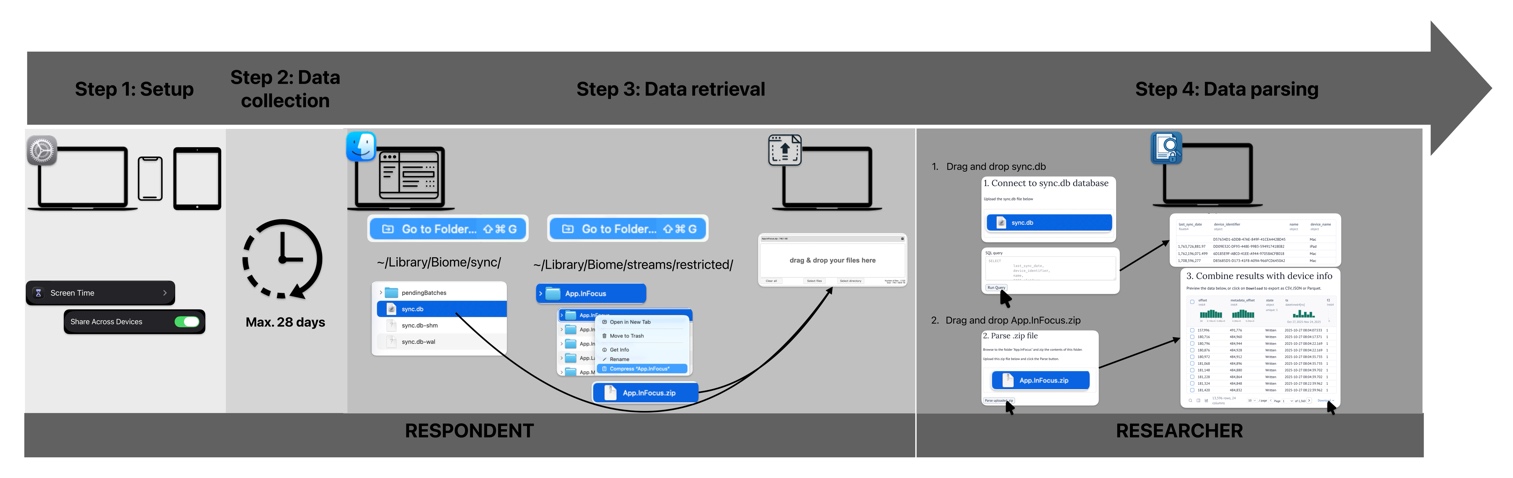
- Navigate to the publicly available Marimo Notebook: <https://molab.marimo.io/notebooks/nb_iVkKovhPYZBGnMVggpXWSL/app>
- Drag and drop the collected files of the participants
OR
- Run a local instance of the Marimo Notebook through docker:
- Install Docker desktop
- Download the tool from the Project OSF: <https://osf.io/6puxm/?view_only=b44063a220204bdca33b964e2e8a4ebd>
- Run from the Root Repo:
```bash
docker load -i ios-biome-screen-time.tar
docker run -p 8080:8080 kvgaever/ios-biome-screen-time:latest
```
- Go to <http://localhost:8080>
- Drag and drop the collected files of the participants
### Step 1. Set-up — On Device
Ensure all devices use the same Apple ID. Enable Screen Time Synchronization:
**On Mac:**
1. Open **System Preferences**.
2. Click on **Screen Time**.
3. Scroll down and toggle **Share Across Devices** to **ON**.
**On iPhone:**
1. Open **Settings**.
2. Tap on **Screen Time**.
3. Scroll down and toggle **Share Across Devices** to **ON**.
**On iPad:**
1. Open **Settings**.
2. Tap on **Screen Time**.
3. Scroll down and toggle **Share Across Devices** to **ON**.
**On Apple Watch:** No extra settings need to be changed.
Once synchronization is enabled, the Mac will store a file containing log data from all the devices that are synchronized.
### Step 2. Data Collection
Wait for the desired logging period (e.g., 14 days) to collect comprehensive data. The database will store use data of the last 4 weeks or since synchronization was enabled, whichever is shorter.
### Step 3. Data Retrieval — On Device and Transfer
**Locate Sync.db:**
1. Open **Finder** on the Mac.
2. From the top menu, select **Go \> Go to Folder...**
3. Enter the following path: `~/Library/Biome/sync/Sync.db`
**Locate and compress the biome files:**
1. Open **Finder** on the Mac.
2. From the top menu, select **Go \> Go to Folder...**
3. Enter the following path: `~/Library/Biome/streams/restricted/`
4. Locate the folder named **App.InFocus**.
5. Zip the App.InFocus folder.
**Retrieve the folder and the Sync.db file:** Let the respondents donate the compressed folder and the Sync.db file using a data donation method.
### Step 4. Data Parsing — On Device of Researcher
Open the Tool & drag and drop the sync.db file and the compressed folder to the right location and download the dataset in a usable format.