2 Methods
2.1 Introduction
This chapter documents the methodological foundations of the three empirical studies presented in this dissertation (Chapters 3-5). All three studies draw on the same overarching research design, combining intensive experience sampling and passively collected digital trace data from Android smartphones and, for a subset of participants, personal computers.
The chapter has two aims. The first is descriptive: to document the data collection procedures, processing pipelines, and analytic strategies shared across the empirical chapters. As the introduction chapter argued, the paradigm shift towards relying on digital trace data rather than self-reports intends to address some important limitations of self-reported media use (Ohme et al., 2021; Parry et al., 2021), but these trace data introduce their own measurement challenges. Digital traces do not speak for themselves, but require decisions about what is logged, how raw traces are cleaned and aggregated, and how resulting features are operationalized as indicators of theoretically relevant constructs (Olteanu et al., 2019; Parry & Klingelhoefer, 2025). These decisions are consequential, yet they are frequently relegated to appendices or supplementary materials, limiting the ability of researchers to evaluate and replicate data processing pipelines, and prompting calls for more transparent and detailed documentation of these pipelines (Baumgartner et al., 2023; Geyer et al., 2022; Parry & Klingelhoefer, 2025; Parry & Toth, 2025). This chapter aims to counter that tendency by offering a detailed overview of the entire trace-to-indicator workflow. Given that behavioral trace data become increasingly common in the social sciences, I thus hope this chapter can respond to a growing need for detailed accounts of the decision-making involved in transforming raw device logs into analytical variables, a process that is rarely reported in full (Parry & Toth, 2025).
The second purpose is reflexive: to make explicit how the many preprocessing and feature construction decisions shape the kind of behavioral indicators trace data can yield, and by extension, reflect on the theoretical claims they can support. This reflexivity is warranted because trace data are, for the most part, not designed with research in mind but are byproducts of platform and device architecture (van Atteveldt & Peng, 2018). Researchers must therefore make a series of choices: what data to retain, how to aggregate and label raw traces, and how to operationalize the resulting features as proxies for theoretically relevant constructs.
This concern is not unique to the present dissertation. Recent work has demonstrated that the number of defensible analytical choices available to researchers is vast. Using specification curve analysis, Orben & Przybylski (2019) showed how plausible “forking paths” in operationalizing technology use or well-being, or which co-variates to include, produce diverging effect estimates. Similarly, multiverse analyses, including one I contributed to (Murphy et al., 2025), show that preprocessing decisions directly shape the patterns of observed effects. The findings from any single analytical path may be accurate, but they are also contingent on decisions that are rarely present in standard reporting. This chapter responds to that problem not by implementing multiverse analyses, but by offering a detailed, fully documented account of the specific path taken in this dissertation: documenting the decisions, their rationale, and the constraints they impose. In doing so, the chapter also sets the stage for the empirical studies that follow, each of which illustrates how methodological choices alter what trace data can reveal.
To achieve the above purposes, the chapter is organized into five sections. The first section, titled Data collection, describes the study context. All studies were conducted within the DISCONNECT project, which took a particular approach to participant recruitment, and resulted in the capturing of three data sources: mobile experience sampling data, Android trace data, and computer trace data. The second section, titled Data processing, details the cleaning, event inference, and quality control steps applied to each trace data source. Next, in a third section titled Combining Traces with Experience Sampling, I will explain how behavioral logs were temporally aligned with ESM time windows to create the analytic datasets. Fourth, the Feature Calculation section presents the typology of behavioral features, from basic volume to cross-device metrics, computed across the empirical chapters. Finally, the Analytic Strategy section outlines the multilevel modeling approach, as well as the centering and temporal lagging procedures common in all three studies. Within each of these sections, I describe the decisions that I took and reflect on the challenges that came with them, and what downstream implications they have had for the empirical studies (and project).
2.2 Research Design
2.2.1 Data Collection
The data used for the studies in this dissertation were collected in wave 1 of the DISCONNECT project. Data collection for this wave took place between October and December of 2022 in Flanders, Belgium. Participant recruitment and scientific outreach occurred in collaboration with De Standaard, a major Flemish newspaper, enabling broad reach while introducing specific sampling considerations. Advertisements appeared on the newspaper’s website and in print. Given that the newspaper targets an older, more educated audience, this impacted our sample composition: We recruited a slightly older and certainly more educated demographic compared to a representative sample. For instance, most were highly educated (93% had at least a bachelor’s degree), with an average age of 38.83 (SD = 11.72).
Participants were incentivized through the offer of a personalized report, with insights into their own media usage patterns and associations with well-being, and free access to events and lectures related to the project. There were no monetary incentives for participation. This likely implies that participants were on average highly motivated to participate, perhaps because of their own experiences (and struggles) with digital well-being.
Participants took part in a two-week study period consisting of intensive mobile experience sampling while simultaneously collecting behavioral trace data from their Android and computer devices. In total, 3,065 participants expressed their interest in the study, of whom 1,315 eventually participated. Among these participants, 774 individuals provided Android trace data (after cleaning), and of this subsample, another 106 individuals also provided computer trace data.
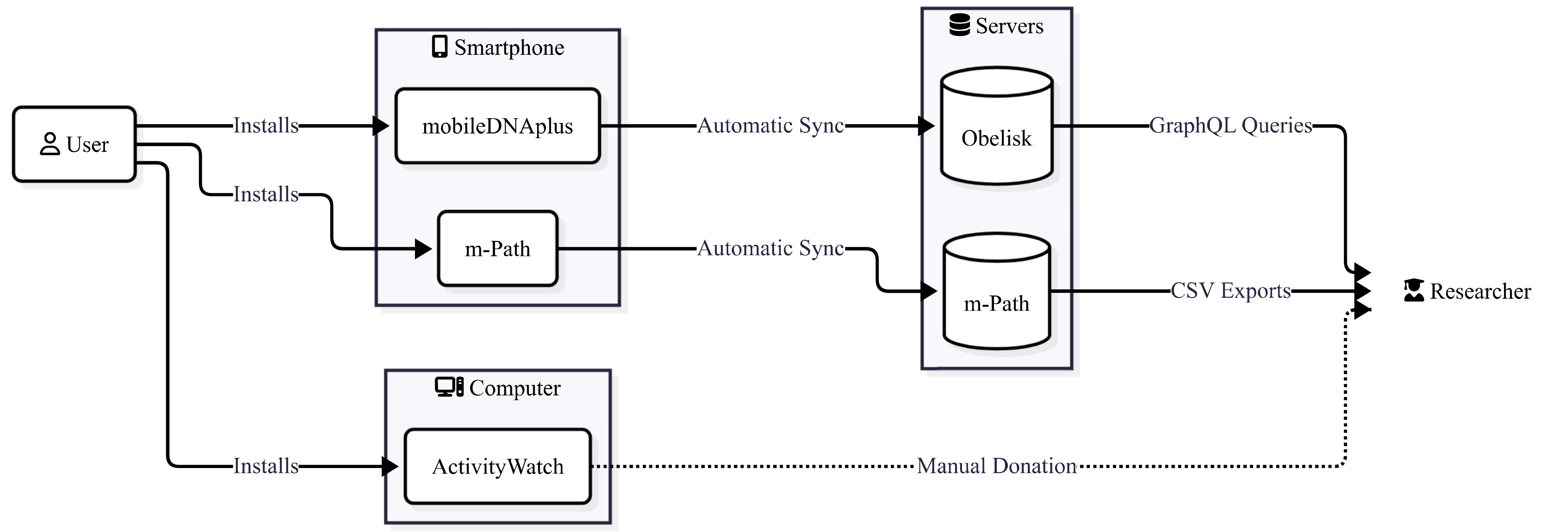
Below, we provide a brief overview of each data source collected (mobile experience sampling, Android trace data, and computer trace data). Figure 2.1 provides a graphical overview of all data sources.
2.2.1.1 Mobile Experience Sampling
To carry out surveys and momentary assessments, we used m-Path1, a tool developed as a KU Leuven spinoff, allowing researchers and practitioners to conduct momentary assessments. The tool works on both Android and iOS devices and enables asking short, in-the-moment questionnaires.
Each day, participants received six questionnaires distributed between 07:30 and 22:45, and this for a period of two weeks. Each questionnaire was scheduled at random within 90-minute time slots and remained active for 45 minutes with a reminder being sent after 30 minutes. This scheduling ensures temporal variability while maintaining sufficient separation between assessments (minimum 1h15m, maximum 4h15m).
Each first questionnaire of the day prefaced its questions with the stem “Since getting up…”, while all other questionnaires used “Since the last questionnaire…”. Participants were instructed to interpret this regardless of having completed this questionnaire or not. This retrospective framing was a deliberate choice with methodological consequences. Alternative ESM stems, such as “How … are you feeling right now?” or “In the past hour, …”, would have altered both the subjective construct being measured and the temporal alignment with trace data. A “right now” prompt captures momentary states, but creates ambiguity about which behavioral window it corresponds to (i.e., the preceding minutes, the hour before?). A fixed retrospective window (e.g., “in the past hour”) would standardize the recall period, but could also leave out important digital behavior that took place in the time before. Our chosen approach aimed to create a natural correspondence between the subjective report and behavioral trace window, as both relate to the same time span. However, it also means that participants are retrospectively evaluating periods of variable length, which may introduce systematic differences in recall quality, and shape which behavioral-outcome associations can be detected Klingelhoefer et al. (2025).
2.2.1.2 Android Trace Data
Due to the strictness of Apple’s App Store policies, prohibiting apps designed to measure smartphone behavior, we were limited to collecting Android trace data, while iPhone users were asked to report daily on their Apple Screen Time metrics. Although m-Path now has access to mobile sensing, at the time of our project, this was still in development. As such, we employed a separate app to log mobile trace data.
Android participants were instructed to install ERC mobileDNAPlus, an app developed by the research group IDLab at the UGent Computer Science department. This app was loosely based on a previous tool developed by external developers of digital product studio In The Pocket in collaboration with our own research group, imec-mict-UGent. IDLab also hosted the server infrastructure 2 platform, to which the app transmitted collected trace data 3.
Data transmission occurred at intervals determined by the app, and only when the participant’s device was connected to Wi-Fi, to reduce any mobile data usage for the participant. The Obelisk platform provided us with data export and query capabilities, enabling extractions of raw trace logs for further processing.
The mobile tracing app collects three main data sources: App events, Screen events (or sessions), and Notification events, which were exported separately based on data source. As both mobileDNAPlus and its predecessor have unfortunately not been made open source, however, we cannot completely detail how raw smartphone trace data is collected. This reliance on closed-source tooling is a transparency limitation worth noting. Although we document the data structures and processing steps in detail below, the initial logging — what the app records, at what resolution, and under which conditions — remains partly opaque to us as researchers. This is a common challenge in behavioral sensing research, where scholars often depend on third-party tools whose internal logic is not fully accessible Geyer et al. (2022). It also means that the “raw” data we describe below are themselves ultimately already a product of certain design choices made by the developers, prior to any processing on our part.
2.2.1.3 Computer Trace Data
As an optional step, participants could choose to install software that locally tracks computer trace data. We chose to use a third-party open-source software bundle, ActivityWatch4, aimed at providing users with detailed, raw computer activity events from a Quantified Self mindset. By default, ActivityWatch enables two “watchers” or data streams: aw-watcher-afk, which checks if a user was active or afk (away from keyboard), based on mouse and keyboard activity, and aw-watcher-window, which tracks the active window, its title and URL. Our empirical chapter using computer trace data focused only on the aw-watcher-window data stream.
Out of data minimization principles, a custom version of the software was developed together with the founder of ActivityWatch. This version modified how the aw-watcher-window data stream handled event data before storage. For non-browser applications, the window title was removed, retaining only the executable name (e.g., “slack.exe”). For browser applications (e.g., Chrome, Firefox, Safari), the software applied a keyword matching logic to the window title: if the title contained a recognizable word – such as “facebook”, “gmail”, or “youtube” – it was replaced with a corresponding category label (e.g., “Facebook”, “Email”, “YouTube”). Browser traces without a matching keyword received the label “excluded”. A similar matching procedure was also applied to the URL field. In all cases, both the raw window title and URL were removed after categorization, as these could contain sensitive private information and provided minimal added value for our intended analyses. The resulting category labels varied in granularity: some were platform-specific (e.g., “Facebook”, “Instagram”) while others related to broader functional categories (e.g., “News”, “Work & Productivity”). These platform-specific labels were subsequently mapped to broader genre categories during data processing (see below). This custom version of the software can be found on GitHub: https://github.com/simonperneel/activitywatch_ERC.
Data from the aw-watcher-window data stream can be exported as JSON objects, containing a list of all events. Below we present an example of three window events. Each event contains a “data” object with the app name and title, a timestamp (ISO8601 formatted UTC), and a duration value (in seconds). An important distinction: duration represents time when a specific window was in the foreground. In other words, if multiple windows were active at the same time, only the “active window” duration was calculated. Ideally, this would be cross-checked with aw-watcher-afk data, to ensure all active, yet AFK durations are not included. Unfortunately, a large portion of participants did not export their AFK data, forcing us to rely only on active window durations. The absence of AFK data means that our computer duration metrics may overestimate active engagement: a participant who left their computer open on a document while grabbing a coffee would be seen as actively using that application. This limitation is particularly relevant for interpreting cross-device features (Chapter 5), where simultaneous smartphone and computer activity may partly reflect a computer session left passively open rather than genuine multi-tasking.
As ActivityWatch keeps the data stored locally, participants exported and transferred their data file(s) through a secured file-transfer service. An example of the window data can be found below.
{
    "data": {
        "app": "EXCEL.EXE",
        "title": null
    },
    "duration": 1.099,
    "timestamp": "2022-11-02T23:14:24.710000+00:00"
},
{
    "data": {
        "app": "chrome.exe",
        "title": "Email"
    },
    "duration": 19.443,
    "timestamp": "2022-11-02T23:23:02.765000+00:00"
},
{
    "data": {
        "app": "chrome.exe",
        "title": "excluded"
    },
    "duration": 77.169,
    "timestamp": "2022-11-02T23:21:44.525000+00:00"
}
Example data of our custom-version of ActivityWatch:
Three window events, of which the second shows that the software found a match based on URL or title and remapped the “title” value to “Email”. The third event presents a browser event where no mapping can be made.
2.2.1.4 iOS Trace Data
As mentioned above, due to Apple’s strict policies, the development of a parallel iOS trace data app was not possible during our data collection phase. Chapter 6, however, presents a new method developed after our main data collection period ended which does allow for granular screen time tracing on Apple devices. Please refer to the chapter for further details.
2.2.2 Data Processing
In this section, we describe all data processing steps that went into transforming raw trace data into processed datasets suitable for linkage with experience sampling data.
2.2.2.1 Processing Android Trace Data
2.2.2.1.1 Screen Data
Raw Screen data is presented in Table 2.1. Each row contains a timestamped screen event, which has four distinct options (see the “value” column): “Off”, “On”, “Locked”, and “Unlocked”. The “metric” column labels the type of data source, the “source” column contains the unique participant identifier, and the “tsReceived” timestamp column records when the server received a (batch) of data from the smartphone.
| Timestamp | Metric | Value | Source ID |
| 15:52:09.281 | smartphone.screen | Off | b8af69c1 |
| 15:52:09.281 | smartphone.screen | Locked | b8af69c1 |
| 15:52:10.130 | smartphone.screen | On | b8af69c1 |
| 15:52:15.066 | smartphone.screen | Unlocked | b8af69c1 |
Of most interest to us was knowing when screens were active and inactive. The act of locking or unlocking the device is mostly very close in time to the related screen “On” or “Off” events. However, not all these events are. For example, imagine someone turning on the screen to check a notification (preview) and then turning the screen off again. These logs would only include the “On” and “Off” values but exclude “Unlocked” and “Locked” events. We chose, however, to parse the Screen data into the format shown in Table 2.2, with each row containing an “On” and “Off” event and timestamp.
Step 1: Data processing started by sorting the data chronologically within participants based on the timestamp of events.
Step 2: Next, screen-state events were filtered to retain only “On” and “Off” events, discarding “Locked” and “Unlocked” states.
Step 3: Because each row recorded only the timestamp of its screen activity, we needed to determine when that event ended, i.e., for each “On” event, we needed to find a corresponding “Off” event. We inferred this by treating the start timestamp of the subsequent event (within the same participant) as the stop timestamp of the current event. Concretely, for each row, we copied the start timestamp and screen sate from the following row into two new columns – labeled session_stop and shift_screen, respectively– so that each row now contained both its own start information and the start information of the next event (an operation sometimes referred to as shifting or lagging in data processing).
Step 4: Finally, we noticed sequences where consecutive events shared the same state (e.g., two successive “On” events, likely indicating a missed “Off” event). These sequences were removed, so that only rows were retained where an “On” event was immediately followed by an “Off” event.
The above procedure has implications: By collapsing the four screen states into On/Off pairs, we prioritized a clean metric of screen-active duration over a more nuanced account of lock/unlock behavior. This means, for instance, that brief screen activations without unlocking, such as glancing at a notification preview, are counted as screen-on time but are not distinguished from fully unlocked, interactive sessions. An alternative approach could have preserved the Locked/Unlocked distinction, enabling separate metrics for “glance” versus “engaged” episodes. We chose the simpler representation, however, for three reasons: our primary interest was total active screen time as an input to further feature calculation; the On/Off structure facilitates annotation of App event logs with corresponding Screen sessions (see Application Data processing below); and the locked vs unlocked distinction is partially captured by our monitoring feature used in Chapter 3. However, this choice means that our screen duration metrics may slightly overestimate active engagement.
| uuid | session_start | screen | session_stop | shift_screen |
| b8af69c1 | 09:07:32.043 | On | 09:07:32.518 | Off |
| b8af69c1 | 09:08:18.801 | On | 09:14:29.467 | Off |
| b8af69c1 | 09:18:21.543 | On | 09:20:29.568 | Off |
| b8af69c1 | 09:39:57.207 | On | 09:42:20.572 | Off |
2.2.2.1.2 Application Data
Application event data contain a starting timestamp and a packagename (i.e.: the internal application name used in Android, under the “value” column). Table 2.3 shows an example, while Table 2.4 presents a minimized version with only relevant columns for further processing.
| timestamp | metric | value | source | tsReceived |
| 1668502963450 | smartphone.application | be.argenta.bankieren | b8af69c1 | 1668730009627 |
| 1668502963944 | smartphone.application | com.android.systemui | b8af69c1 | 1668730009627 |
| 1668502969162 | smartphone.application | com.google.android.input… | b8af69c1 | 1668730009628 |
| 1668502972788 | smartphone.application | be.argenta.bankieren | b8af69c1 | 1668730009628 |
| 1668502973820 | smartphone.application | com.google.android.input… | b8af69c1 | 1668730009628 |
In its unprocessed state, it would be impossible to calculate accurate screen time metrics, as there are only events starting, never stopping. This shows that preliminary data cleaning needs to be considered to correctly account for application screen time.
The example application data in Table 2.4 starts with a banking app (be.argenta.bankieren) being opened, followed by a system process (com.android.systemui) and the Google keyboard “app” launching (com.google.android.inputmethod.latin). Below, we present the five-step process of processing application data.
Step 1: We chose to remove keyboard application events, to attribute all time spent using the keyboard within an app as part of that app’s screen time. This decision treats keyboard use as part of the parent application rather than a distinct behavioral event. An alternative would have been to retain keyboard events and attribute them separately, which could allow for distinguishing between passive consumption (e.g., scrolling) and active production (e.g., typing a message). However, as keyboard events in our data lacked both metadata about the parent app context in which they occurred and stop timestamps, accurate attribution would have been unreliable. For example, consider a participant scrolling through a social media app who receives an incoming message notification. The participant can reply directly via the notification tray without ever foregrounding the messaging app. In our data, the resulting keyboard event would carry no metadata indicating which app context triggered it, making it impossible to reliably attribute the typing activity to either the social media or messaging app. We therefore opted for the more conservative approach of absorbing keyboard time into the preceding application.
Step 2: Next, we needed to infer a stop event for each app, indicating that the app was now no longer active in the foreground. We did this with four additional steps. First, we sorted the data frame on timestamp and participant, then shifted each startTime and app to its previous row, when matching the same uuid. Table 2.5 shows this data frame.
Second, we identified the boundaries between different apps by comparing package names of consecutive events. When two successive events involved different package names, this transition marked a boundary. When consecutive events shared the same package name, they were treated as belonging to the same uninterrupted sequence of use for that app. We assigned a run identifier – a unique label for each such connected sequence – so that, for example, three consecutive events for be.argenta.bankieren would all receive the same run identifier, distinguishing them from a later, separate sequence of events for the same app.
Third, these data were aggregated at the level of the participant and run identifier. For each run we then extracted:
The app associated with the run (i.e. the package of the first event)
The start time of the run (i.e. start time of the first event)
The stop time of the run (i.e. end time inferred from the last shifted start time)
The app associated with the final shift event (as a consistency check)
Fourth, we retained the columns required for further analysis and sorted the dataframe chronologically within participants. An example of the resulting dataframe is shown in Table 2.6. Here, we can see that the consecutive rows where the be.argenta.bankieren app was used are now flattened into a single application event.
Step 3: We annotated Application data with Screen data. This allowed us to define stop times of Application events which ended due to the screen turning off, instead of a new app being opened. For each Application event, we looked backwards to identify the closest “Screen On” event and forward to the closest “Screen Off” event. These values were then added to each row of the data frame. See Table 2.7 for an example and refer to Table 2.2 for the relevant Screen events which were added.
Step 4: With this data frame we can finally calculate the correct Application stop times and, following, their duration. We did so by calculating an effective stop time value, which takes the earliest value between the Application stop time and the annotated Screen end time. Duration was then calculated as the difference between the start time and the effective stop time.
Step 5: As a final step in preparing the Application data frame, we included metadata of more than 4.000 packages, including app name (e.g., “Instagram” for package “com.instagram.android”) and genre, which we obtained through the Google Play Store (e.g., “Social” for com.instagram.android), as well as a custom genre label we manually added for apps missing this information or when the genre provided by the Play Store was deemed ill-fitting. For instance, the Google Play Store genre labels do not always align with how apps are used in practice: Google Chrome is for example labeled as “Communication” in the Play Store, which we changed into “Browser”, as we preferred to only label chat and messaging apps as “Communication” (e.g., WhatsApp, Signal). Our custom labels attempted to correct the most prominent mismatches and better align categories with those relevant to our research questions. Any categorization scheme inevitably simplifies the multifunctional nature of most apps, however (Hall, 2023; Vanden Abeele et al., 2025). For instance, an app classified as “Social Media” may also serve as a primary channel for private messaging (Hall, 2023), and platform-level genre labels, such as those provided by app stores, are themselves unstable and inconsistently applied across operating systems (Vanden Abeele et al., 2025). This is particularly relevant for our categorical features (see Feature Calculation), where the theoretical meaning of, for instance, “social media duration” clearly depends on which apps were included in that category.
| uuid | startTime | app |
| b8af69c1 | 09:02:43.450 | be.argenta.bankieren |
| b8af69c1 | 09:02:43.944 | com.android.systemui |
| b8af69c1 | 09:02:49.162 | com.google.android.input… |
| b8af69c1 | 09:02:52.788 | be.argenta.bankieren |
| b8af69c1 | 09:02:53.820 | com.google.android.input… |
| uuid | startTime | app | shift_start | shift_app |
| b8af69c1 | 09:02:43.450 | be.argenta.bankieren | 09:02:43.944 | com.android.systemui |
| b8af69c1 | 09:02:43.944 | com.android.systemui | 09:02:52.788 | be.argenta.bankieren |
| b8af69c1 | 09:02:52.788 | be.argenta.bankieren | 09:02:55.392 | be.argenta.bankieren |
| … | … | … | … | … |
| b8af69c1 | 09:04:28.009 | be.argenta.bankieren | 09:04:31.575 | com.android.launcher3 |
| b8af69c1 | 09:04:31.575 | com.android.launcher3 | 09:04:31.707 | com.google.android.google... |
Rows omitted above (…) are subsequent application events of be.argenta.bankieren.
| uuid | app | start | stop | shift_app |
| b8af69c1 | be.argenta.bankieren | 09:02:43.450 | 09:02:43.944 | com.android.systemui |
| b8af69c1 | com.android.systemui | 09:02:43.944 | 09:02:52.788 | be.argenta.bankieren |
| b8af69c1 | be.argenta.bankieren | 09:02:52.788 | 09:04:31.575 | com.android.launcher3 |
| b8af69c1 | com.android.launcher3 | 09:04:31.575 | 09:04:31.707 | com.google.android.google... |
| uuid | app | start | stop | session_start | session_stop |
| b8af69c1 | be.argenta.bankieren | 09:02:16.199 | 09:02:37.009 | null | 09:07:32.518 |
| b8af69c1 | com.android.systemui | 09:02:37.009 | 09:02:43.450 | null | 09:07:32.518 |
| b8af69c1 | be.argenta.bankieren | 09:02:43.450 | 09:02:43.944 | null | 09:07:32.518 |
| b8af69c1 | com.android.systemui | 09:02:43.944 | 09:02:52.788 | null | 09:07:32.518 |
| b8af69c1 | be.argenta.bankieren | 09:02:52.788 | 09:04:31.575 | null | 09:07:32.518 |
2.2.2.1.3 Notification Data
Notification events are the third and final data stream captured by the Android application. Each row contains a participant identifier (“uuid”), a corresponding app (“app”), a timestamp signifying when the notification action “POSTED” took place (“postedOn”). Next, the “action” column shows whether a new notification was created or an existing one updated, i.e. “POSTED”, or whether a notification was removed and no longer visible, i.e. “REMOVED”. These removals can occur through different processes; the integers in the “reasonRemoved”5 column clarify these. The “clicked” column shows when a “REMOVED” action was triggered due to the user clicking on the related notification. Finally, the “id” column contains a notification identifier, while “time” provides the timestamp of the current action. An example of notification data can be found in Table 2.8.
| uuid | app | postedOn | action | reasonRemoved | clicked | id | time |
| c507d674 | com.whatsapp | 11:03:43.360 | POSTED | null | null | 1 | 11:03:51.984 |
| c507d674 | com.whatsapp | 11:01:32.288 | REMOVED | 6 | false | 1 | 11:03:52.249 |
Without processing, notification traces showed massively inflated numbers, as these included both background (i.e. “system”-based) and foreground (i.e. those a user can view/interact with) notification events. Again, these data required multiple cleaning steps to become usable for metrics and analysis.
Step 1: Data cleaning started by dropping all duplicate rows and dropping rows where a notification event had the same uuid, app, action, and a timestamp at the same second.
Step 2: In addition, we removed all notification events for three specific packages: android, com.android.systemui, com.google.android.apps.maps. The first two packages appeared to be system-only notifications which a user does not interact with; the third had highly inflated numbers, as, for instance when navigating a route with Google Maps, each direction update is logged as a separate notification event. These first two steps already removed 61.9% of all notification events in the dataset (to N = 4,123,138). The case of Google Maps, however, illustrated a broader challenge: notification data conflate user-facing notifications with system-level events that are logged identically. Our removal decisions were based on manual inspection of the most frequent notification sources, but less common system-generated notifications from other apps may still be present in the dataset. This is an inherent limitation of working with device-level notification logs, which do not natively distinguish between notifications a user perceives and those generated in the background.
Step 3: Next, we refined the dataset by looking at the id column. The id column does not contain unique values but rather reuses identifiers over time. Many notifications appeared to be related to the same id and action, however. We started by sorting the data frame by participant and timestamp, and creating shifted versions of key variables (uuid, app, action, and id) backwards, i.e. the attributes of the next notification in the sequence. By comparing these, we looked for changes in the sequences. Whenever any of these attributes changed, we considered this a new notification event. A run identifier was added to keep track of these changes and allowed for “duplicates” to later collapse onto themselves. We did this by taking the first occurrence of stable attributes within these groups (e.g., the app, action and notification id) and the last occurrence of time-varying or shifted attributes (e.g., timestamp and app of the subsequent event). This further deduplicated the dataset by 59% (to N = 1,709,011).
Step 4: As a last step, we again added category (or genre) metadata to allow for analyses at the categorical level. An example of the cleaned notification data frame is shown in Table 2.9.
| uuid | time | app | action | reasonRemoved | clicked | id | custom_genre |
| c507d674 | 17:57:52 | com.whatsapp | POSTED | null | null | 1 | chat |
| c507d674 | 18:03:41 | com.whatsapp | REMOVED | 8 | false | 1 | chat |
| c507d674 | 18:12:46 | be.smartschool .mobile | REMOVED | 1 | true | 451 | education |
| c507d674 | 18:28:58 | com.snapchat .android | POSTED | null | true | 1943 | chat |
2.2.2.2 Processing Computer Trace Data
The processing pipeline began by merging individual JSON files into a single data frame. Donated data files were organized in separate per-participant folders, named by each participant’s unique identifier, allowing us to annotate each participant’s data accordingly during import.
Next, we integrated the browser-level category labels produced at the collection stage (see above) with a broader application-level categorization. We generated a frequency-ranked overview of all programs and browser categories appearing in the data. For the 221 most frequently occurring entries – which together accounted for 97% of all traces – we manually assigned a standardized display name and genre category (e.g., OUTLOOK.EXE was given the name “Outlook” and category “Email”). For browser traces that had already received platform-specific labels from the custom software (e.g., “Facebook”, “Instagram”), this step assigned broader genre categories (e.g., “Social Media”). Browser traces that had not matched any keyword during collection, previously labeled “excluded”, were relabeled as “Browser – Other”. Traces from applications outside the top 221 were labeled “Other”. These were added to all applicable traces, while traces without a matching category were labeled as “Other”. Table 2.10 illustrates the final structure of the processed computer trace data.
| uuid | start | stop | duration | app | category | name |
| 052536e1 | 14:49:36.737 | 14:49:39.007 | 2.27 | slack.exe | work communication | Slack |
| 052536e1 | 14:49:40.149 | 14:49:42.419 | 2.27 | Spotify.exe | music&audio | Spotify |
| 052536e1 | 14:49:43.525 | 14:49:55.765 | 12.24 | slack.exe | work communication | Slack |
| 052536e1 | 14:56:28.075 | 14:56:29.156 | 1.081 | Signal.exe | chat | Signal |
| 052536e1 | 15:19:15.720 | 15:19:35.53 | 19.81 | slack.exe | work communication | Slack |
2.2.2.3 Quality Control and Participant Exclusion
After calculating application durations, we looked at cleaning outliers and removing irrelevant Application events which should not count towards someone’s screen time. Before cleaning, the dataset contained 9,953,496 events. We identified duration outliers as Application events exceeding 240 minutes and dropped these from the data frame (N=5,617 or 0.056%%). This threshold of a single uninterrupted 240-minute app event is unlikely to reflect genuine continuous use, and more plausibly indicates a logging or data processing error, or an app running in the background. However, we acknowledge that any fixed threshold involves a trade-off. A lower threshold would be more conservative but risks excluding genuine long sessions, for instance a participant watching more than 4 hours of feature film through a streaming app. A higher threshold would retain more data but introduce more noise from logging artefacts. We examined the distribution of single app event durations and found that 240 minutes represented a clear inflection point beyond which events became extremely sparse and were often associated with known system apps. As we only collected start times of Application events, and had to rely on imputed stop times, we felt we struck the right balance with this threshold. Researchers applying similar pipelines should be aware that this threshold, like all cleaning decisions, shapes the resulting distributions of duration-based features and should be calibrated to their specific research context.
Next, we removed all rows for which we had no stop or session_start timestamps, removing an additional 60,393 rows (or 0.61%).
In addition, we removed Application events from apps we deemed irrelevant when calculating screen time metrics, such as: Always On Display (AOD) apps, fingerprint sensor apps, and apps without package names (N=1,552,835 or 15.71%). As users do not really engage with these applications, we felt these could be omitted. A full list of these apps is included on Chapter 3’s OSF page: https://osf.io/bd5jt/. Finally, we looked at duration outliers for system-related applications, such as “android” and “com.android.systemui”, calculated specific thresholds for each and dropped them from the dataset (N=114,973 or 1.38%).
Certain Android devices (such as Huawei, Xiaomi, and Samsung models) had operating system restrictions which limited ongoing data logging. We implemented a monitoring dashboard to detect data loss patterns as quickly as possible and provided device-specific instructions to restore tracking permissions (see https://dontkillmyapp.com/). Nonetheless, when calculating day-level trace data metrics, participants were removed from the dataset if they had fewer than seven days of data. Descriptives at the day-level (e.g. average daily screen time) were calculated by first removing everyone’s first and last days of log data, to account for “incomplete” days.
Finally, the ESM dataset was cleaned using two criteria that were pre-registered: only participants with at least eight completed questionnaires were retained, and the completion time of a questionnaire had to be thirty seconds or longer.
2.2.3 Combining Traces with Experience Sampling
After initial trace data processing, the next step in the processing pipeline entailed combining trace data and experience sampling data. Our final datasets for analysis were focused at the level of each experience sampling beep, allowing us to model momentary associations. In other words, each trace needed to be labeled with the correct ESM time window to allow for aggregation at the same time span.
Earlier, we explained that our ESM schedule contained six beeps daily for two weeks. An important consequence of using variable-length ESM windows is that the same absolute amount of screen time (e.g., 30 minutes) represents a different proportion of the available window depending on whether that window was 75 minutes or 4 hours long. While our within-person centering and standardization procedures (see Analytic Strategy) partially account for this variability, researchers should be aware that raw feature values are not directly comparable across windows of different lengths. We did not normalize features by window length, as doing so would alter the interpretative meaning of the variable (e.g., from “how much was used” to “what proportion of available time was used”), which may not always align with the theoretical construct of interest. We present Table 2.11, Table 2.12, and Table 2.13 as an example of one participant’s ESM windows, trace data (unlabeled) and trace data (labeled with ESM windows) to make clear how we assign each app episode with a matching questionnaire window. This labeled dataset then provides the basis for aggregating trace data into beep-level indicators (such as total duration and frequency of app and app categories) used in subsequent analyses.
An important prerequisite before combining experience sampling and trace datasets was ensuring temporal compatibility. Both datasets needed to use consistent timestamp formats and time zone representations, and participants had to be linkable across datasets through shared unique identifiers. In our case, aligning timestamps required particular vigilance regarding Daylight Saving Time transitions that occurred during the data collection period, as well as any instances of participants crossing time zones. We detected misalignment by cross-referencing data sources, for example, identifying cases where a participant had completed an ESM questionnaire at a given time, yet no corresponding m-Path app event appeared in the trace log at that timestamp. Resolving such discrepancies requires systematic inspection of individual participant timelines. We draw attention to this step because timestamp alignment in multi-source data is often more labor-intensive than anticipated, and errors at this stage propagate silently into all downstream feature calculations and momentary modelling.
| uuid | date | question | time_wakeup | time_sent | time_start |
| 052536e1 | 17/11/2022 | Q1 | 07:20 | 08:00 | 08:03 |
| 052536e1 | 17/11/2022 | Q2 | 10:00 | ||
| 052536e1 | 17/11/2022 | Q3 | 12:00 | 12:01 |
| uuid | start | stop | app |
| 052536e1 | 07:45 | 07:55 | |
| 052536e1 | 08:10 | 08:20 | |
| 052536e1 | 09:10 | 09:12 | Gmail |
| 052536e1 | 10:10 | 10:25 | Chrome |
| 052536e1 | 11:30 | 11:40 | Chrome |
| uuid | app | start | stop | question | window_start | window_end |
| 052536e1 | 07:45 | 07:55 | Q1 | 07:20 (wake-up) | 08:03 (answered start) | |
| 052536e1 | 08:10 | 08:20 | Q2 | 08:00 (prev sent) | 10:00 (sent; missed) | |
| 052536e1 | Gmail | 09:10 | 09:12 | Q2 | 08:00 | 10:00 |
| 052536e1 | Chrome | 10:10 | 10:25 | Q3 | 10:00 (prev sent) | 12:01 (answered start) |
| 052536e1 | Chrome | 11:30 | 11:40 | Q3 | 10:00 | 12:01 |
2.2.4 Feature Calculation
All features calculated across the three empirical chapters were derived from the combined ESM-trace datasets such as described above, where each behavioral trace is aggregated to its corresponding ESM time window. This temporal alignment enabled modeling of momentary associations between digital behavior and subjective well-being states. The features can be organized into a typology that reflects increasing levels of theoretical specificity and behavioral complexity.
At the most basic level, volume features quantify the intensity of digital engagement through simple aggregation of trace events within each ESM time window. These form the foundation upon which more complex indicators are built. Duration sums the total time spent within specific applications (from app and/or computer data). Frequency counts the number of discrete events: app launches (from app and/or computer data), screen activations (from screen data), or notifications received (from notification data). While volume features alone reveal little about the nature of the engagement with an app, they provide essential baseline metrics. These features capture total exposure, which theories of media effects have long positioned as a predictor of (well-being) outcomes (although recent work questions this assumption, e.g., (Brinberg et al., 2023; große Deters & Schoedel, 2024; Kaye et al., 2020; Schenkel et al., 2024)).
The same volume features become more meaningful when disaggregated by app category. Rather than treating all screen time as equivalent, we categorized screen time into theoretically meaningful groups: email, work communication, social media, chat, and total (aggregated across all categories). This disaggregation aligns with calls to move beyond screen time as a monolithic construct (Kaye et al., 2020; Meier & Reinecke, 2021). Categorical features allow an increased alignment between behavioral indicators and theoretical expectations. Even though the trace data do not provide insight into content, they acknowledge that what people do digitally matters next to how much they do it. For example, in Chapter 4, when examining time pressure, the theoretical expectation differs by category. Email and work communication features are hypothesized to increase feelings of being rushed, as they can signal increased work demands, while social media might have more neutral or even restorative associations.
While volume features look at “how much?”, and categorical features answer “what kind?”, fragmentation features address “how is this behavior distributed in time?”. These features capture the temporal structure of digital engagement, revealing whether screen time accumulated across multiple short bursts or rather through sustained sessions. For example, two participants might each use smartphone email apps for 30 minutes within a 3-hour ESM window. Participant A could have one 30-minute session (low fragmentation), while Participant B could have fifteen 2-minute sessions (high fragmentation). Despite identical duration, the dynamics of this behavior are drastically different. These dynamics could potentially impact related psychological outcomes, as highly fragmented behavior could, for example, signal more frequent task-switching, attentional disruption or habitual checking (Siebers et al., 2024; Van Gaeveren et al., 2025).
In other words, fragmentation quantifies the dispersion of duration and frequency across an ESM time window. Low values indicate concentrated use in fewer, longer sessions. High values indicate that the same total duration or frequency is dispersed across many brief episodes. Several operationalizations of fragmentation have been proposed in the literature. Alexander et al. (2010; 2011) developed multidimensional indicators of spatial and temporal activity fragmentation in the context of transport research, while Pan et al. (2019) proposed temporal stability parameters for smartphone use patterns, primarily aimed at identifying compulsive use. More recently, große Deters and Schoedel (2024) developed fragmentation indicators specifically for smartphone sensing data, capturing the distribution of usage and non-usage episodes. We adopted the operationalization proposed by Siebers et al. (2024), as their metric was designed for ESM-linked smartphone trace data and aligns most directly with our time-windowed feature calculation approach.
Next, some features were explicitly designed to operationalize theoretically relevant constructs. These aimed to serve as proxies for certain behavioral states or processes, based on the theoretical reasoning of what observable behavior might represent these constructs. In Chapter 3, we aimed to operationalize these proxies for the construct of online vigilance, defined as a state of heightened awareness, monitoring, and reactibility to digital communication (Reinecke et al., 2018). Concretely, we examined monitoring behavior by capturing the number of times a participant unlocked their phone for 5 seconds or less, without responding to a notification. This behavior reflects self-initiated “checking-in” on one’s digital environment. Next, responsiveness was calculated as the percentage of notifications clicked relative to those received. High responsiveness suggests heightened reactibility, as users are acutely aware of, and interact with, incoming notifications. Finally, we operationalized reaction time as the average time (in seconds) between receiving a notification and clicking it. Fast reaction times could also indicate increased reactibility. These three features represent an attempt to map observable smartphone behavior onto psychological constructs, but as Chapter 3 will show, logged behavior may not always serve as a valid indicator of these subjective experiences.
All features described above can be calculated from single-device trace data. In Chapter 5, we introduce cross-device features, where smartphone and computer data are integrated to try and capture how people coordinate digital activities across devices. We attempted to go beyond additive logic, e.g. total screen time is the sum of smartphone and computer screen time, to also reveal patterns which can only be observed when multiple devices are tracked simultaneously. Device switching counts the number of times a participant alternated between devices. A switch occurs when either a participant stops using Device A and immediately switches to Device B, or, during active use of Device A, Device B is used. Next, context switching extends the previous feature to identify when a device transition also involves a change in activity category. For example, moving from email computer use to smartphone social media use would be seen as a context switch. Finally, overlapping device use measures the proportion of screen time where both devices were active simultaneously, calculated separately per device. These cross-device features assume that temporal co-occurrence of device activity reflects meaningful behavioral coordination. However, as noted above, the absence of AFK data for computers means that some instances of “overlapping use” may reflect a passively open computer, rather than active multi-device engagement. Similarly, device switching is identified through temporal proximity of events across devices, but the threshold for what counts as “immediate” involves a researcher-defined parameter. These features should therefore be understood as an approximation of cross-device dynamics rather than precise measurements.
The final level of our typology recognizes that even basic behavioral features gain psychological meaning through subjective processes or the context in which they occur. Rather than treating behavioral features as standalone predictors, here, we model interactions or mediations with subjective experiences. For example, Chapter 4 discusses the relationship between multiple communication features and feeling rushed, where we hypothesized that this relationship would operate through perceived juggling load (the experience of having to juggle multiple tasks). For example, the same amount of email notifications could feel overwhelming when juggling work and personal roles but be manageable when focused purely on the work domain. This approach acknowledges that behavioral features may be most informative when combined with subjective reports that reveal how digital interactions are experienced.
Table 2.14 contains an overview of all features used throughout this dissertation.
| Feature Level | Examples | Information | Chapters |
| Volume | Duration, Frequency | Basic exposure metrics | 3, 4, 5 |
| Categorical | Email duration, Email frequency | Content-specific patterns | 4, 5 |
| Temporal structure | Fragmentation | Distribution of behavior in time | 4, 5 |
| Theory-aligned | Monitoring, Responsiveness, Reactivity | Behavioral proxies for psychological constructs | 3 |
| Cross-device | Device switching, Context switching, Overlapping use | Multi-device coordination patterns | 5 |
| Contextualized | Features x Subjective mediator/moderator | Subjective meaning of behavior | 3, 4 |
2.2.5 Analytic Strategy
All empirical chapters employ multilevel modeling to account for the nested structure of experience sampling data, where repeated observations (level 1) are nested within individuals (level 2). This enables decompositions of variance into within-person and between-person components.
Prior to formal analysis, variables underwent several steps to allow for multilevel modeling. To isolate within-person from between-person differences, level 1 variables were person-mean centered (Enders & Tofighi, 2007). This ensures that fluctuations in an individual’s behavior relate to their own mood or well-being, independent of stable between-person differences. Behavioral features were also within-person standardized (mean = 0, SD = 1, for each participant) to facilitate comparison across features with different scales.
Level 2 variables, representing person-level averages, were grand-mean centered, and primarily served to saturate the between-person model, rather than serve as a predictor (e.g., Chapter 3’s models).
To test temporally lagged associations (e.g., whether digital behavior at T0 predicts well-being at T1), selected variables were lagged to subsequent rows in the dataset. Constraints were applied to ensure valid temporal lagging: 1) within-person only, 2) within-day only, and 3) only between subsequent completed questionnaires. As such, we avoid lagging across different people, days, or questionnaires which were further back in time than the previous one.
While the dissertation focuses mostly on momentary associations, some analyses also examined daily associations as a comparison or robustness check. Momentary models used raw outcome variables (e.g., feeling happy, feeling rushed) measured at each ESM prompt, paired with the behavioral features aggregated within the corresponding time window. Daily models used aggregated daily averages for outcomes, and daily sums for predictors, which again were within-person centered and scaled (day totals within person totals). This approach lets us test whether associations differ depending on temporal granularity, an important topic in current media effects debates (Klingelhoefer et al., 2025).
Data processing and feature calculation were carried out in Python using pandas (team, 2020) for Chapters 3 and 4, Dask (Dask Development Team, 2016) for Chapter 3, and Polars (The Polars Development Team, 2025) for Chapter 5. Additional data transformations were carried out in R using dplyr (Wickham et al., 2025), esmpack (Viechtbauer & Constantin, 2023) and misty (Yanagida, 2023). Statistical analyses were also carried out in R, using: lme4 (Bates et al., 2015) in Chapters 4 and 5, lavaan (Rosseel, 2012) in Chapter 3, and in Python using pingouin (Vallat, 2018) in Chapter 4. All analysis code is available on the OSF page of each respective study.
Finally, each chapter’s Methods section provides additional details on specific implementations concerning exact model specifications, handling of control variables, specific mediation or moderation tests, and model adaptations when fit criteria were not met.
2.3 Conclusion
This chapter has outlined the methodological foundations underlying the empirical studies presented in this dissertation. By combining intensive experience sampling with passively collected digital trace data across devices, the research design aimed to capture digital media use and digital well-being as dynamic, situated processes unfolding in everyday life.
Documenting the full processing pipeline makes clear how much decisions cascade. Choices made at early stages of the pipeline constrain and shape what is possible at later stages, in ways that are not always immediately visible. Consider the following chain: how we parse Screen data directly affects how we annotate Application data with screen sessions (Step 3 of application processing), which in turn helps determine the effective stop times and durations we calculate (Step 4). These durations become the basis for the volume and fragmentation features used later on. A different parsing decision at the screen level would have propagated through the entire pipeline, producing different duration and feature values, and hence potentially different inferential outcomes.
Similarly, notification cleaning decisions affect both the notification features used in Chapter 3 (responsiveness, reaction time) and the monitoring feature, which relies on screen activations without a preceding notification click. If our cleaning was overly strict, i.e. considering legitimate notifications as system noise, the monitoring metric would be systematically inflated, as more screen activations would appear to lack a linked notification.
These cascading dependencies are rarely acknowledged in digital trace research, where processing steps tend to be described more as independent operations. In practice, the pipeline functions in an interconnected manner, where early-stage decisions create dependencies that shape subsequent indicators. Documenting the full pipeline, as we have attempted here, is a necessary first step towards making these dependencies visible, but even our documentation cannot fully quantify their cumulative impact on the final analytic results.
The data processing pipeline documented in this chapter reveals that cleaning digital trace data is not a neutral, technical operation that separates signal from noise. Every cleaning decision entails a judgement about what constitutes relevant behavior. When we removed Always On Display or fingerprint sensor apps, or apps without package names, we were not correcting errors in an otherwise accurate record. We were deciding that these events should not be counted as screen time. When notification events were dropped from system packages, we judged these to be irrelevant to our notification-based indicators. The 240-minute outlier threshold for application durations entailed the assumption that single app events exceeding four hours more likely reflect a logging artefact than genuine behavior. Each of these decisions is defensible, but a different research team investigating other research questions could have easily reached different conclusions about what to retain or which steps to take.
Digital trace data are frequently described as providing a more accurate or objective account of behavior compared to self-reports (Parry et al., 2021). Our pipeline illustrates both the merit and the limits of this characterization. Trace data are indeed free from recall bias and social desirability effects. However, the events that a device logs are not the same as the behaviors a researcher wants to study. The gap between logged events and the theoretical constructs, what has been called the “inferential leap” (Conrad et al., 2021; as cited in Pankowska et al., 2025), must be bridged by a series of processing decisions, each of which introduces researcher judgement into the data. As such, these data occupy a position between objective and subjective. Recognizing this status does not diminish the value of trace data, but it also underlines the need to account for inherent biases and error present within these data (Bosch et al., 2025; Pankowska et al., 2025).
This chapter has aimed to be transparent about the trace-to-indicator pipeline. Transparency alone, however, is not the same as reflexivity. Throughout the preceding sections we have attempted to move between the former and the latter, by noting at various points how a different decision would have altered the resulting data. Yet, we recognize that our attempt remains incomplete. For every decision we have flagged and reflected on, others went unexamined, including decisions made by the tools themselves (e.g., how the logging app determines when an app “starts”). Full reflexivity would require much more space than we have already attributed. What we hope to have demonstrated is that the level of detail provided here already reveals a number of consequential choices that would otherwise remain invisible.
Several limitations of the current framework warrant discussion. First, logged data do not always allow for a clear distinction between non-use and missing data, especially when device-level restrictions (e.g., Android battery optimization or permission changes) interrupt logging without the researcher’s knowledge. Although we implemented monitoring and exclusion procedures to mitigate this, residual data loss likely remains in the dataset. Second, interaction with a device cannot be equated with engagement or attention. This is especially the case for desktop-based activities, where a window left open in the foreground may reflect passive presence rather than active use, a problem aggravated by the absence of AFK data. Relatedly, trace data cannot identify who is operating a device during a logged session. Device sharing has been recognized as a behavioral barrier to valid passive smartphone measurement more broadly (Keusch et al., 2022), though large-scale survey evidence suggests it occurs rarely in general adult populations. In our study, however, several participants reported lending their smartphone to their children, for instance to watch a video, meaning that these episodes were logged and attributed to the participant despite reflecting another person’s activity. This form of misattribution is largely invisible in the data and difficult to correct for systematically, though it could be partially addressed in future work through momentary self-report prompts or device-sharing flags. Third, the pipeline described here was developed for a specific dataset and research context. While we have attempted to document decisions in sufficient detail for others to evaluate and adapt, direct generalizability to other tools or research contexts should not be assumed.
These limitations highlight why behavioral trace data cannot replace subjective reports. Research questions related to how digital interactions are interpreted, whether experienced as stressful or meaningful, or how they fit within broader role demands, remain inaccessible through behavior logs alone. Experience sampling can hence greatly complement trace data and play a part in interpreting patterns of behavior more clearly.
The empirical chapters that follow build on this framework in complementary ways, and in doing so, test different aspects of the pipeline’s assumptions and limitations. Chapter 3 examines the mismatch between subjective and objective indicators. Chapter 4 explores how increasing behavioral granularity and context alter associations with time pressure. Chapter 5 questions the consequences of extending measurement scope beyond the smartphone. Together, these studies illustrate how methodological decisions shape what digital trace data can and cannot tell us about digital media use and well-being.
https://idlab.ugent.be/resources/obelisk↩︎
The original plan was to have mobileDNAPlus collect both trace data and experience sampling data, so that participants would only have to install one app rather than two. Unfortunately, IDLab was unable to meet its promise – while the questionnaire functionality was operable, the notifications functionality did not work, leading our team to make a last-minute switch to m-Path for collecting the ESM data.↩︎
https://activitywatch.net/↩︎
A full list of these values and their meaning can be found in the Android Developer documentation, under the Constants section (see: REASON_*) https://developer.android.com/reference/android/service/notification/NotificationListenerService↩︎