6 Making the Impossible Possible
Leveraging built-in features for non-intrusive and accurate Apple Screen Time tracking through ASTER1
6.1 Abstract
This paper describes a novel procedure to collect Screen Time data from iOS, iPadOS, WatchOS and MacOS devices using their built-in Apple Screen Time features. Traditional methods of studying digital behavior often rely on self-reported data, which are prone to inaccuracies (i.e., recall bias), limiting their validity and granularity. While Android devices have long facilitated real-time and granular behavior tracking through third-party applications, similar tools are not available on Apple devices due to Apple’s restrictions. This is problematic because there are significant differences between the user populations of iOS and Android. To address this gap, this study developed a data donation procedure that leverages the synchronization of screentime enabling the extraction of comprehensive usage data of iPhones, iPads, Apple Watches and Macs linked to the same Apple ID. The process involves donating system-level files used to generate Screen Time metrics on Mac, containing anonymized use data of all linked devices. We developed a tool that enables researchers to process these files into a usable dataset (e.g., csv, JSON). This dataset provides granular insights into app usage without requiring substantial technical expertise or financial investment. While this approach enables the integration of Apple cross-device behavior into digital media research, it is limited to users with a Mac and can only capture data from the previous four weeks. Additionally, the method is vulnerable to changes in Apple’s software structure echoing the moving target problem. Nonetheless, this method marks an important step forward in current approaches to the passive sensing of smartphone behavior.
Keywords: Passive Sensing, Apple, Screen Time, Monitoring, iOS, iPadOS, MacOS, WatchOS, digital phenotyping
6.2 Introduction
Measuring user behavior on mobile devices such as smartphones and laptops is crucial for academic research in the social and behavioral sciences, where a growing number of researchers attempt to unravel the correlates and effects of using digital media. For instance, how digital media use is linked to political participation and polarization (Chan & Yi, 2024), physical health (Nisafani et al., 2020), educational performance (Limniou, 2021), or mental well-being (Meier & Krause, 2023). To date, however, methodological challenges remain in the study of digital media use and its effects (Parry et al., 2022). A first challenge is that most research still relies primarily on cross-sectional self-report data. This traditional approach is often inadequate for capturing user behavior, as it lacks both specificity and validity (Araujo et al., 2017; Ohme et al., 2021; Parry et al., 2021):
With respect to specificity, self-reported measurements of media behavior, such as survey questions assessing daily smartphone use, afford only a coarse capture of online behavior; they lack the granularity needed to find clear relationships between these behaviors and outcomes of interest. Researchers may, for instance, be specifically interested in the fragmented nature of digital media use (Araujo et al., 2017; Griffioen et al., 2020), and/or may need access to the real-time dynamics of the behavior to understand its temporal associations with outcomes, such as time perception (Ross et al., 2023) or distraction (Siebers et al., 2024). This granularity becomes especially relevant when considering the use of passively sensed online behavior for the digital phenotyping of users’ health and well-being (e.g., Aalbers et al., 2023), or for other forms of real-time predictive analytics that use digital trace data (e.g., for digital forensics).
With respect to validity, there is a known discrepancy between actual and self-reported (i.e. perceived) digital media behavior. A main reason for this discrepancy is recall bias (Parry et al., 2021; Scharkow, 2016; Sewall et al., 2020). Studies show that this discrepancy is systematic; it is greater, for instance, among individuals with psychosocial vulnerabilities (Sewall et al., 2020), and heavier users are more likely to underestimate the frequency of their behavior and vice versa (Vanden Abeele et al., 2013). There are also problems of social desirability in self-report responses (Ellis et al., 2019; Parry et al., 2022), and there is a risk of common method bias (Parry et al., 2022).
There is growing consensus among social and behavioral scientists that the above shortcomings in the accurate and valid measurement of digital media behavior severely limit the extent to which we can rely on self-report data for understanding how digital behavior affects individuals. Scholars are, therefore, increasingly responding to this issue by seeking alternative ways to measure digital media behavior, most notably through the collection of passively monitored digital behavior, which, albeit not entirely free from biases, is currently considered the ‘gold standard’ (Meier & Krause, 2023; Parry et al., 2022).
In the past five years, several studies have successfully measured objective smartphone behavior using both off-the-shelf and custom-built mobile applications (e.g., de Segovia Vicente et al., 2024; Johannes et al., 2021). However, most available passive sensing apps are limited to Android devices. While Android-based sensing is feasible, it often requires substantial effort, expertise, and time to adapt processing scripts for specific research purposes. Other frameworks, such as Screenomics, rely on screen capture analysis (Reeves et al., 2021). Yet, none of these logging approaches work on iOS. This limitation stems from Apple’s strict App Store policies, which prohibit apps designed to measure smartphone behavior, and from the Screen Time API’s lack of specificity and sandboxed nature. The omission of iOS data in the research field is problematic (Baumgartner et al., 2023) given that more than 30% of smartphones run iOS (De Marez et al., 2022). Moreover, Android and iOS users differ in sociodemographic profiles and psychological traits, with iOS devices generally positioned as premium products (Shaw et al., 2016).
Some scholars currently circumvent this problem using data donation procedures in which people donate screen captures of the built-in ‘Apple Screen Time’ features of the iPhone operating system (e.g., Baumgartner et al., 2023; Ohme et al., 2021). These screen captures can then be automatically ‘read’ using a custom-developed script that enters the information of the photo or video into a database. These solutions can collect aggregated information about iOS smartphone behavior (e.g., daily smartphone use or number of pick-ups for a particular app) but still lack the granularity of Android logging methods, which usually capture and timestamp every interaction with the device. Moreover, these procedures need intensive data processing protocols (i.e. for the processing of a video feed), and require effort, expertise and time from researchers to, for instance, tailor processing scripts to very specific use cases (Baumgartner et al., 2023). Given that platforms and their features and designs are constantly evolving (Bayer et al., 2020), these protocols also require frequent updating. Importantly, the process of providing daily screen captures is also rather cumbersome for participants, which may lead to attrition. In the study of Ohme et al. (2021), for instance, only 11.6% of the full sample ultimately donated their mobile log data. To avoid this, incentivization may need to increase, creating a higher financial burden on researchers.
In this paper, we present an alternative solution for leveraging data donations to capture screen data from iOS smartphones. The procedure that we present in this paper leverages high-quality, granular digital trace data of the participant’s smartphone use, while requiring very little effort, budget, time and expertise from the researcher to implement, and demanding very little effort from the participant. To set everything up participants need to tick a box on each device they want to include (e.g., their Mac, iPhone, iPad, Apple Watch). Then, to donate the data they need to follow an easy step-by step process that takes less than 5 minutes. Because the procedure requires synchronization between an iOS, iPadOS or WatchOS device and a Mac computer, the use of it is conditional on the participant having a Mac computer and all other Apple devices should be linked to the same unique Apple ID. Nonetheless, we believe that our method offers additional ethical and legal benefits, and affords a novel way to meet the scientific goal of collecting the same granular use data from iPhones, iPads and Apple Watches that can be collected from Android phones.
As for the scientific goals, our procedure also opens new opportunities: Because it requires the synchronization with the user’s Apple computer device, our procedure allows to capture data from all (Apple) devices that the user has embedded in their personal digital ecosystem under the same Apple ID. This has great value. After all, iPad data and laptop data are often neglected in current studies involving mobile sensing, while it is clear that cross-device usage is an important element of how people interact with the online world (Montanez et al., 2014; Tseng et al., 2023), and that people show different usage patterns on different digital devices (Bröhl et al., 2018). Since laptops, tablets, smartwatches, and smartphones can all be part of an individual’s personal media ecology, excluding data from these devices when analyzing online behavior risks overlooking significant aspects of digital behavior, such as device switching.
In what follows, we first explain the protocol that we developed. Together with the manual in Section 8.3, researchers should be able to implement this protocol themselves. Next, we discuss the main benefits and drawbacks of our approach.
6.3 Method
6.3.1 Raw MacOS, iOS, iPadOS and WatchOS Data Donations as a Solution
Most current operating systems have a built-in app for usage logging. On iOS this application is called Apple Screen Time (on Android it is called Digital wellbeing). While the main goal of these built-in applications is to give smartphone users insight in their own usage (e.g., how often someone opens a certain app, how long they use their smartphone, how much notifications they receive), the applications can also be used by scholars to gain access to and thus measure participants’ smartphone behavior without the need of installing a third party app through ‘data donations’ (Ohme et al., 2021). Data donations, such as those used by Baumgartner et al. (2023), shift the role of the user from someone whose data is collected to someone who collects their own data, and donates them to the researcher. In existent Screen Time data donation procedures (e.g. by using screenshots), the data that the user collects, is data that is already collected through the device or platform and has been pre-processed to populate the interface (e.g., Ohme et al., 2021). Our procedure accesses the ‘raw data’ as collected by the operating system itself and entails the parsing of that raw data, without any other aggregation and minimal processing.
6.3.2 A Step-by-Step Guide to Access MacOS, iOS, iPadOS and WatchOS Usage Data
To our knowledge, prior to 2019 there was no way to access the raw data of iOS Screen Time. From 2019 onward, however, Apple released Screen Time for the Mac and implemented a toggle to allow synchronization of Screen Time across Apple devices. With this toggle enabled, the Screen Time program on the Mac collects screentime and usage data of all Apple laptops, iPhones, iPads and Apple watches connected to the same Apple ID. In other words, local databases are produced that not only serve to inform the Screen Time visuals of the Mac, but that are also enriched with the usage data of all other devices from the same Apple ID for which this toggle is enabled. These databases are stored on the Mac of the (Apple ID) owner of the Apple devices. Our procedure uses these databases to get access to logged usage data of the Mac, iPhone, iPads and Apple Watches. The procedure is tested on a variety of devices running the latest software versions at the time of writing (iOS 26, MacOS Tahoe, iPadOS 26, WatchOS 26). Devices running older software versions are not supported because they store Screen Time data elsewhere.
In what follows, we provide a step-by-step overview of the procedure that participants can follow for donating their Screen Time data. An overview of each step can be found in Figure 6.1. The researcher is responsible for the data transfer and for parsing the data using the tool we have developed.
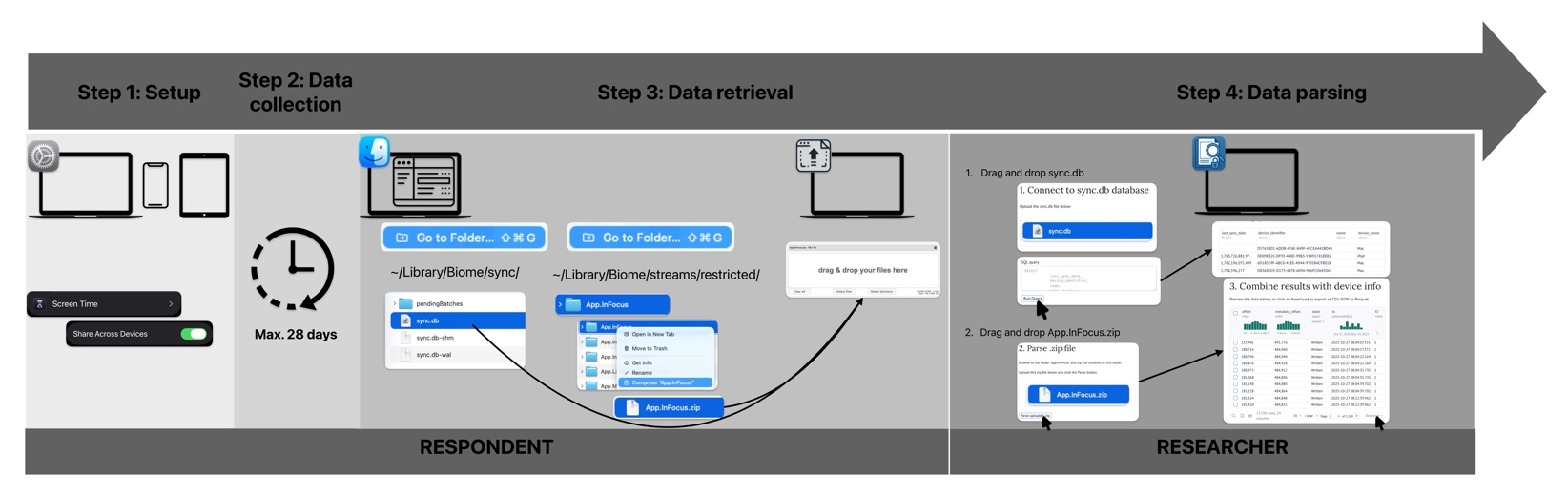
6.3.2.2 Step 2. Data Collection
From the moment the switches are toggled, the usage data of the participant will be synchronized across all devices. The synchronization itself occurs through the personal iCloud of the respondent. Only the last 28 days of usage data is stored in the database, so for studies that run longer, participants need to donate their data on an ongoing, 4-week basis. Once the data collection phase has ended, the participants need to locate all necessary files. They will have to locate both (1) the identification file, to identify the different devices and (2) the Screen Time databases where all their Screen Time data is stored.
6.3.2.3 Step 3. Data Retrieval: Compress and Donate the Folder Containing the Data
The identification file (sync.db) is an SQL database. In this SQL database, the devices can be identified using the device_identifier under the DevicePeer table. The column platform lists the type of device (1=iPadOS; 2=iOS; 3=MacOS; 4=MacOS; Apple watches are not included in this database), if the column last_sync_date is empty, the identifier is the one of the Mac on which the file is accessed.
The Screen Time data is stored in the App.InFocus folder. If different devices are synced (see step 1.), there will be two folders inside the App.InFocus folder, “local” and “remote”. The “local” folder contains all the logdata of the machine on which you are accessing the folder (the Mac). The “remote” folder contains one (if only one other device is synced) or multiple subfolders named using different identifiers (e.g., DD09E32C-DF93-448E-99B3-594917418EB2). The databases inside these folders consist of SEGB encoded biome files which need to be parsed before they are usable. To do so, the parent folder App.InFocus should be compressed and donated to the researcher by the participant together with the identification file.
The identification file and the Screen Time databases are thus located on the filesystem of the Mac computer. At the time of writing this manuscript, this was under the pathnames:
- Identification file: ~/Library/Biome/sync/sync.db
- Folder containing screentime data: ~/Library/Biome/streams/restricted/App.InFocus
To collect the files from the respondents, the files will need to be transferred using a file transfer system that is provided by the researcher. For this step the researcher can use any service that is secure and falls under the legal and procedural regulations of their institution and country.
6.3.2.4 Step 4. Data Parsing by Researcher: Process the Encoded Databases into Usable Format
To parse the data the researcher should run our developed tool. The tool does three important things: it parses the biome files into a usable format, it queries the sync.db file for device identifiers and it creates combined dataframes of the Screen Time data per device. To illustrate the procedure, we included the tool (which can be run locally through a docker image) and example files on the OSF page (https://osf.io/6puxm/?view_only=b44063a220204bdca33b964e2e8a4ebd).
The tool provides a Screen Time dataset for each linked device. The processed datasets are structured as follows: there are 7 different columns in the json/csv files necessary to interpret the usage data, see Table 6.1. The column timestamp refers to the timestamp of the log entry (e.g., 2025-10-30 09:03:48.338232). open_close logs whether an app is opened (1) or closed (0), each app usage will thus have two entries in the dataset (1 and 0). The usage time can be calculated by subtracting the timestamps of both entries. app_bundle shows the App Bundle ID (e.g. net.whatsapp.whatsapp) with which the respondent interacted. last_sync_date is the last time an entry was written to the database (UNIX timecode). This can help when different files should be merged. The first entry will never be more than 28 days before this last_sync_date. device_identifier is a unique identifier that indicates the device from which the data is logged (e.g. F5096A2A-ADAB-5981-B534-DE8DCC8EE313), if these fields are empty, the data is logged from the Mac from which the database is used. device_name (e.g. iPhone) is the linked name from sync.db. For each file there will be only one device name included as the datasets are divided per device.
Only apps in focus are logged. An app is in focus when the app is shown in the top left corner on the mac on an active screen (if multiple screens are used), for the iPhone and iPad this is the app that is visible or that is interacted with (if multiple apps are open), for the Apple Watch this is the app that is open and visible. Apps that are running in the background but are not visible or active are not logged.
Most of the time the App Bundle ID is easily linked to the specific app, however, in some cases the app name is not part of the App Bundle ID. The App Bundle ID for SnapChat, for example, is com.toyopagroup.picaboo. Prior to interpretation, the different application codes will need to be recoded into their respective apps. Overviews of often used App Bundle IDs can be discovered in online repositories2. However, not all App Bundle IDs will be included in these static repositories because of the dynamic nature of digital app usage.
| timestamp | open_close | app_bundle | app_version | last_sync_date | device_identifier | device_name |
| 2025-10-31 10:04:33 | 1 | com.openai.chat | 1.2025.294 | 1764327715 | 9CE1FB04 | iPhone |
| 2025-10-31 10:06:15 | 0 | com.openai.chat | 1.2025.294 | 1764327715 | 9CE1FB04 | iPhone |
| 2025-10-31 10:06:19 | 1 | com.apple (…) | 26.0.1 | 1764327715 | 9CE1FB04 | iPhone |
| 2025-10-31 10:06:36 | 0 | com.apple (…) | 26.0.1 | 1764327715 | 9CE1FB04 | iPhone |
| 2025-10-31 10:06:40 | 1 | org.whisper (…) | 7.82 | 1764327715 | 9CE1FB04 | iPhone |
| 2025-10-31 10:06:43 | 0 | org.whisper (…) | 7.82 | 1764327715 | 9CE1FB04 | iPhone |
6.3.2.5 Step 5. Optional: End Data Collection
Unless explicitly specified otherwise by the participant, researchers can now inform the participant about how to end the data collection. As the procedure leverages built-in features of the iOS, MacOS and iPadOS ecosystems, the participant can stop the data collection by switching off the screen time feature. Nonetheless, as no data is being shared automatically, respondents can also keep on using the ScreenTime feature without sharing any data.
6.4 Discussion
Apple does not provide granular ScreenTime data through its ScreenTime APIs, nor is such data included when users request their personal information through the Data and Privacy portal. Consequently, obtaining usage data from Apple devices remains a significant challenge for both individuals and researchers.
In an earlier version, this study adopted a different strategy with the same idea: exploiting the comparatively less restrictive macOS environment as an access point. At that time, the relevant Screen Time information was stored in the KnowledgeC.db SQLite database, and extraction required only one straightforward SQL query. However, during the review phase, Apple released major operating system updates (iOS 26, iPadOS 26, macOS 26) that rendered this method ineffective. The data was migrated to less interpretable Biome SEGB files, which underpins the current methodology.
This development is a perfect example of the “moving target” problem, wherein Apple’s gatekeeping role enables it to invalidate established data access techniques through routine system updates (Bayer et al., 2020). Although a workaround was identified, this experience underscores the fragility and transience of existing access mechanisms and the power imbalance between researchers and these companies. While current legislation efforts in Europe (e.g., GDPR, DSA) and in other regions in the world (e.g. state level legislation in USA, PIPL…) should enable researchers to access specific use data (through data donations or otherwise), current practices are still fragile and vulnerable to one-sided changes by the companies.
6.5 Benefits, Limitations and Risks
To our knowledge, this article is the first to describe the current procedure for collecting raw, behavioral digital use data of iOS (and iPadOS, WatchOS and MacOS) devices in a privacy sensitive and transparent way. By collecting only research-relevant data, we adhere to data minimization principles. A key benefit of our procedure is that participants only share safe encrypted data which are not easily decrypted without the right software.
A major caveat of our procedure, however, is that it can only be used when participants also have an Apple Mac device. This is especially relevant as people having access to a Mac and other Apple devices might meaningfully differ in sociodemographic profile and psychological traits. Moreover, it is only possible to collect 28 days of data through this method; for longer measurement periods, intermittent extractions must be organized, which can be cumbersome for both researchers and participants.
Finally, a possible risk as discussed above is that Apple changes the way they store, sync, code this dataset. This could possibly render the tools or step-by-step guide inoperative. Consequently, the moving target problem remains, and there are no guarantees that this procedure, which works today, will work in the future.
Nonetheless, despite these caveats, we believe the current procedure is less cumbersome and less effortful for both researchers and participants than alternative data donation procedures. For this reason, we consider our approach an important step forward towards integrating behavioral data from iOS and Mac users in research.
6.6 Open Practices Statement
Materials and tools are available at https://osf.io/6puxm/?view_only=b44063a220204bdca33b964e2e8a4ebd. None of the reported studies were preregistered.
6.7 Declarations
Funding: Funding support for this article was provided by the European Union’s Horizon 2020 research and innovation programme under the European Research Council Starting Grant agreement ‘DISCONNECT’ No. 950635 and the Research Foundation Flanders (FWO-Vlaanderen) under Grant agreement ‘Disconnect to Reconnect’ No. S005923N and ‘CostOf24/7’ No. G075524N.
The funding body was not involved in the study design, the collection, analysis and interpretation of data, the writing of the report or the decision to submit the article for publication.
Conflicts of interest/Competing interest: The authors have no relevant financial or non-financial interests to disclose.
Ethics Approval: The study received ethics approval from the Institutional Review Board of Ghent University (ref. 2022-37).
Consent to participate: Not applicable.
Consent for publication: Not applicable.
Availability of data and materials: All materials are accessible through and downloadable through the OSF platform https://osf.io/6puxm/?view_only=b44063a220204bdca33b964e2e8a4ebd.
Code availability: All code is accessible through the OSF platform https://osf.io/6puxm/?view_only=b44063a220204bdca33b964e2e8a4ebd.
Published as: Martens, M., Van Gaeveren, K. Making the impossible possible: Leveraging built-in features for non-intrusive and accurate Apple Screen Time tracking through ASTER. Behav Res 58, 179 (2026). https://doi.org/10.3758/s13428-026-03065-2↩︎
https://support.codeproof.com/apple-device-management/i-os-app-bundle-id↩︎